If your ad gets 10,000 impressions but 230 clicks, is that a win or a silent budget leak?
CTR is one of the most misunderstood but powerful performance metrics in digital marketing. It shows how many people clicked after seeing a page, ad, or email to see what you actually had to offer.
When someone understands how to calculate CTR and its implications, they can quickly determine whether a campaign is performing well or wasting budget.
This guide breaks CTR down step by step. You will see the CTR formula, simple, realistic examples, and a free CTR “calculator” you can use now.
So, let’s get started.
Calculating and analyzing CTR in 3 simple steps
The first step of calculating CTR for any channel is to gather your data.
#1: Find impressions and clicks
The CTR formula dictates:
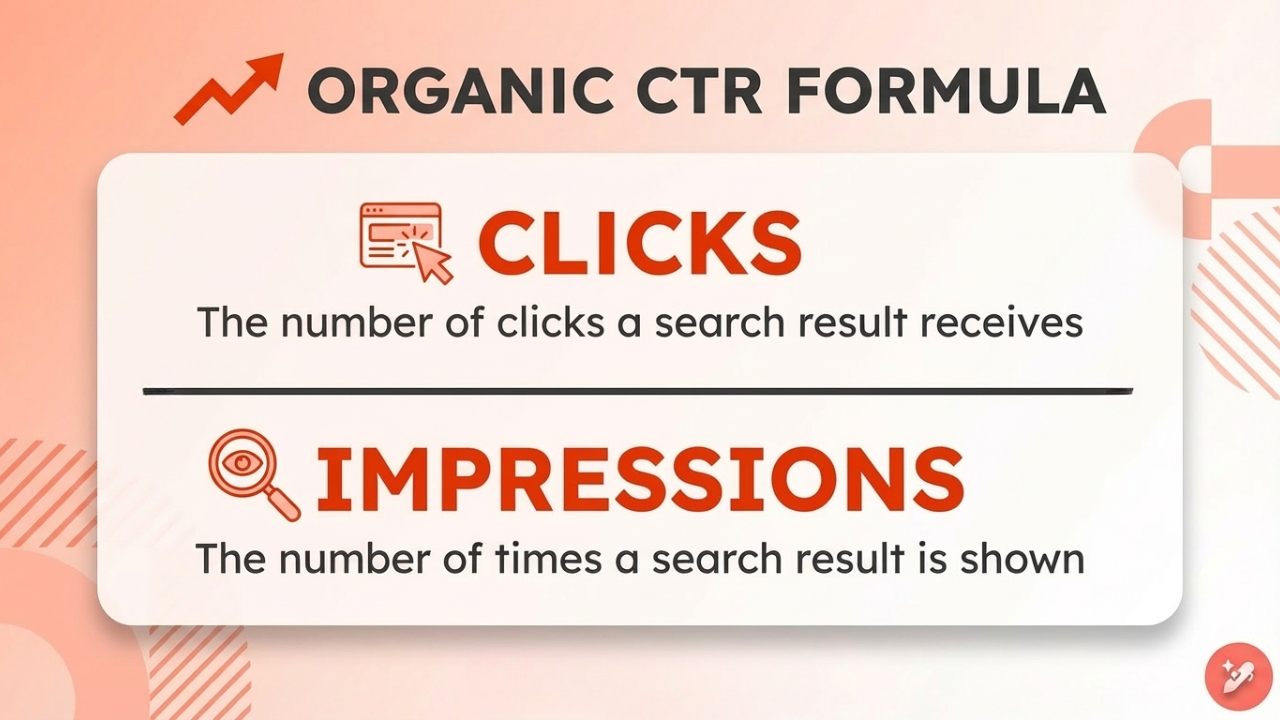
CTR = Total Clicks ÷ Total Impressions x 100
In this equation, clicks refer to the action a user takes. If someone taps or clicks a link, ad, or button that sends them to a landing page, website, app store, or video, it counts as a click.
Impressions record how many times an ad or piece of content is shown to a user’s feed. In paid search, an impression happens when the ad appears on a search results page. For display ads, this is when the banner ad loads on a site.
In short, you need the total number of clicks and impressions your website, advert, email, or any other marketing channel received to calculate CTR.
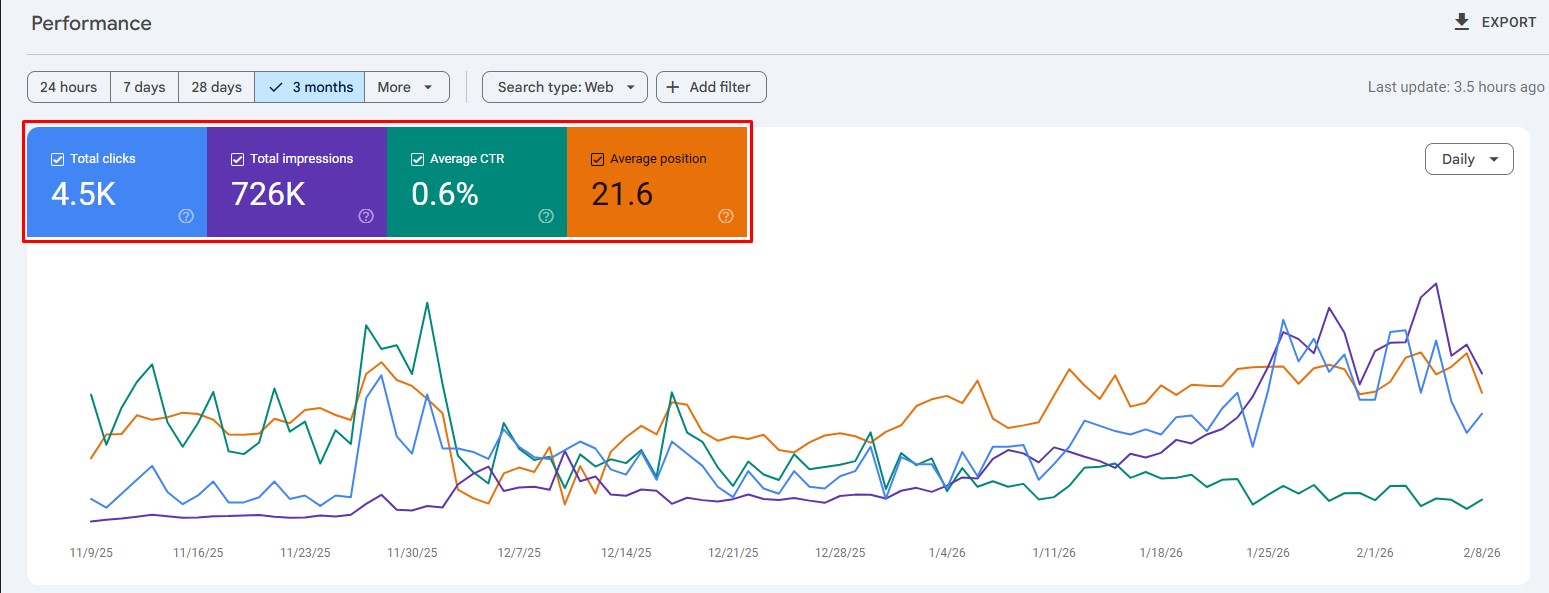
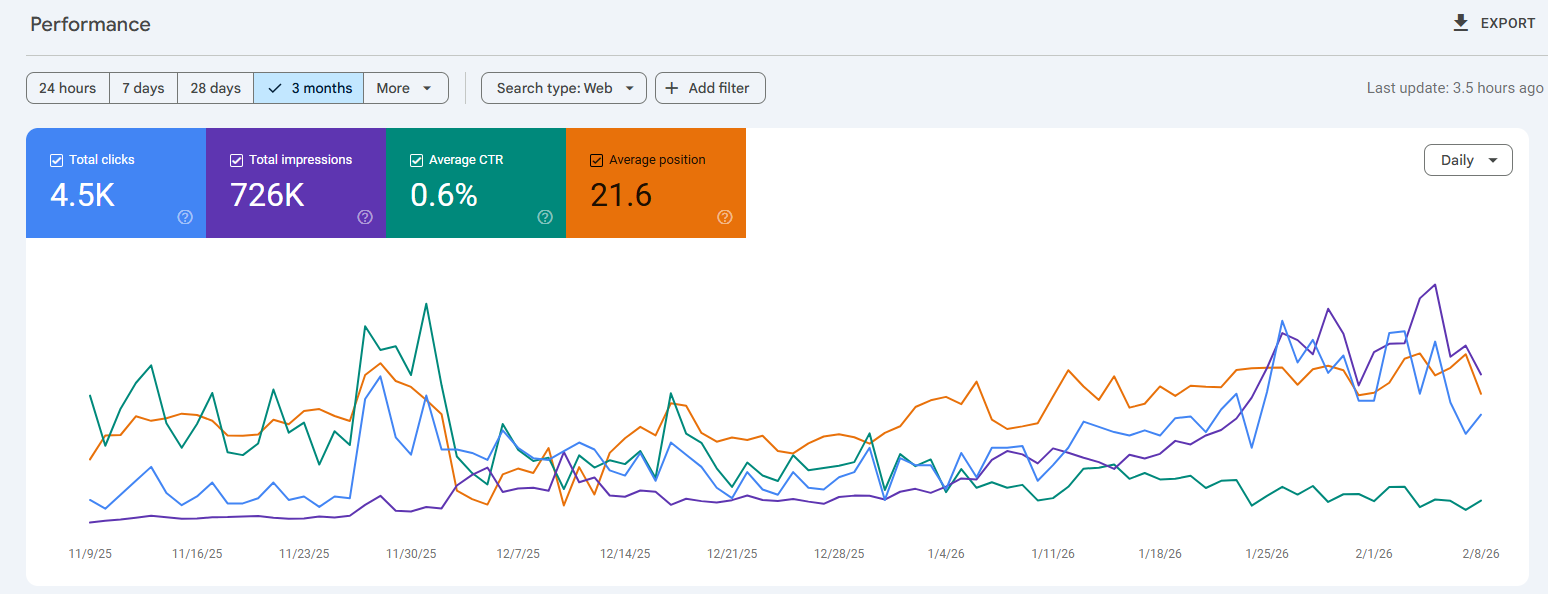
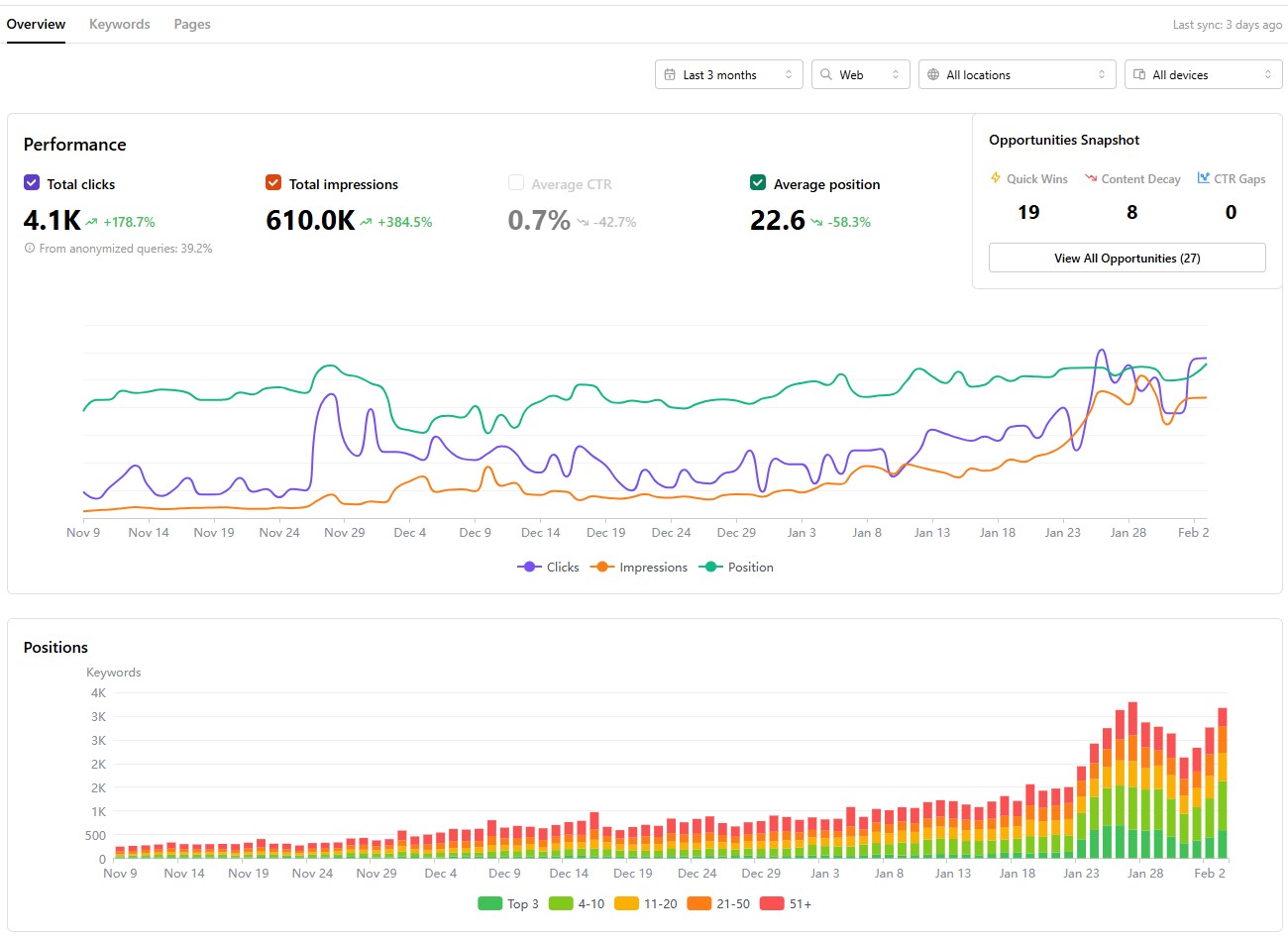
You can use many online tools to get this data. For example, for online platforms or pages, Google Search Console is a good way to get click and impression data.
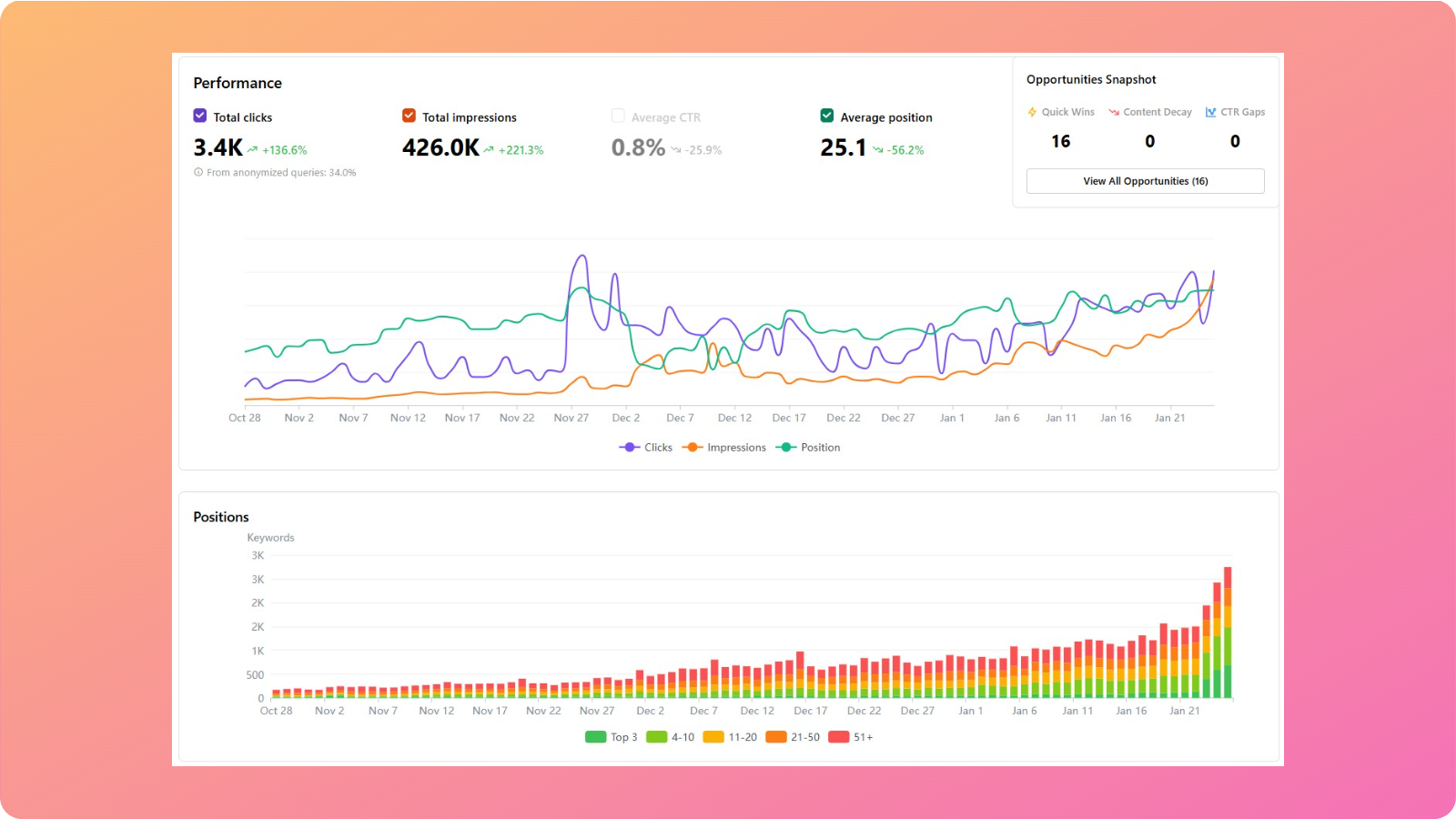
The GSC tool also shows the ‘Average CTR’ for the specific target, helping you track organic CTR across pages or platforms.
That said, it is still a good idea to learn the CTR calculation manually to understand how marketing verticals are performing overall.
#2: Input the data into the CTR calculator
Once you have the number of clicks and impressions, it is time to utilize the CTR (%) formula we mentioned earlier.
Carrying on with our previous example in Search Console, if we have 4500 total clicks and 726,000 total impressions, the CTR would look like:
CTR = [4500 ÷ 726,000] x 100= 0.6198% CTR
As you can see, the CTR we calculated in the example is nearly the same as the ‘Average CTR’ number provided by Google Search Console. This shows that our process was, indeed, a success.
However, if you find the CTR calculation tricky, you can use our free CTR calculator for your convenience:
Try out a few examples to help you get started.
Search ad example: If a search ad gets 1,000 impressions and 50 clicks, then its CTR calculation will be:
50 ÷ 1,000 = 0.05
0.05 × 100 = 5% CTR
That means 5 out of every 100 impressions turned into a click.
Email example: If an email campaign sends 2,500 messages, and 100 people click a link inside, then its CTR calculation will be like:
100 ÷ 2,500 = 0.04
0.04 × 100 = 4% CTR
#3: Analyzing the results
Now that we have our CTR number, it is time to analyze it in depth.
As discussed in our CTR blog, the click-through rate can vary by industry, channel, and targeted keywords. Still, for many search campaigns, a CTR below 2% may indicate room for improvement.
Understanding why your CTR falls short
When your CTR analysis reveals underperformance (like our 0.6% example), the root causes typically fall into three categories:
Content relevance issues: Your titles and meta descriptions may not align with search intent.
Competitive landscape factors: Stronger competitors may be outranking you with more compelling messaging.
SERP environment changes: Modern search results pages contain features that intercept clicks before users reach organic listings.
The first two factors are within your direct control through search engine optimization. The third factor requires a different strategic approach because you’re competing not just against other websites, but against Google’s own features, namely AI Overviews.
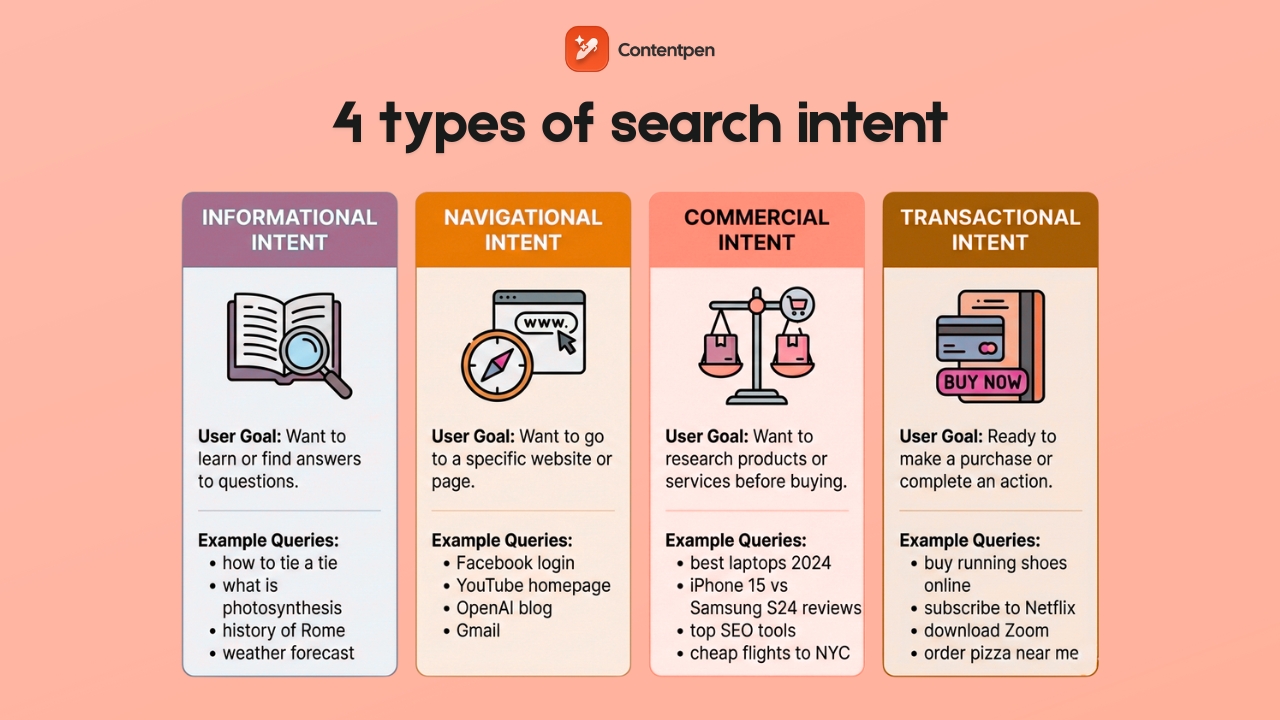
These AI overviews provide ‘zero-click answers’, especially for informational search queries, like ‘How tall is the Eiffel Tower?’ Therefore, users don’t proceed to read lengthy blog posts or articles to get a straightforward answer to a standard question.
That said, commercial and navigational intents still see high CTR since people want to buy diligently and explore extensively.
In 2026, SERP features and AI overviews impact CTR a lot. Let’s explore concrete tactics to maintain strong click-through rates in this changing environment.
How SERP impacts CTR
Modern search results pages (SERPs) display far more than ten blue links. Featured snippets, People Also Ask boxes, local packs, and AI-generated overviews now dominate many SERPs, and each can reduce clicks to traditional organic listings.
Below are some common SERP elements that appear frequently and can impact CTR for your pages:
Featured snippets: Answer boxes positioned above the #1 organic result.
People Also Ask (PAA): Expandable question boxes with quick answers.
Local packs: Map listings showing business information for location-based searches.
Knowledge panels: Information boxes about entities, businesses, or topics.
Image carousels: Visual result grids for image-focused queries.
Video thumbnails: Embedded previews from YouTube and other video platforms.
AI Overviews: Google’s AI-generated answers that synthesize multiple sources.
So if all these factors reduce CTR, is there a way to improve or maintain them?
The answer is YES! There are multiple ways to improve and maintain CTR, even with so many SERP and AI features around.
How to maintain and improve CTR when competing with SERP and AI features
You cannot remove SERP features, but you can position your content to capture clicks alongside them. To do that, you need to implement the following strategies:
#1: Optimize content to win the featured snippet yourself
Structure content with clear question-and-answer formats. Use concise 40-60-word answers immediately following question-style headings.
Tools like Contentpen can help you write SEO and GEO-optimized blogs and articles that help you win more snippets and clicks to your platforms so that you can rank on Google.
Using built-in SEO scoring and SERP analysis, the tool writes click-worthy meta titles, descriptions, headings, and body content, helping you improve conversions and organic traffic.
When you own the featured snippet, your visibility increases significantly, giving you a chance to market your offerings to the right audience and generate a decent return on investment.
#2: Target long-tail and specific keywords
Broad terms like “digital marketing” trigger extensive SERP features, so it is naturally difficult to rank for such keywords.
More specific phrases, such as “calculate email CTR in Mailchimp,” face fewer competing elements and maintain higher organic clicks.
Also, focus on queries that require interaction beyond reading:
✅ “CTR calculator tool.”
✅ “Free CTR tracking template download.”
✅ “Google Ads CTR setup tutorial.”
❌ “What is CTR?” (easily answered by AI.)
❌ “CTR definition” (no click required.)
When you start thinking with this strategy, winning the right clicks becomes much easier.
#3: Focus on branded search optimization
When users search your company name specifically, Google shows fewer competing features because the intent is clearly navigational. For example, the term “Contentpen” has a better chance of appearing on SERPs than plain ‘AI blog writer.’
This tactic helps you achieve a higher CTR, or at least maintain it for your brand in the long term.
#4: Write irresistible title tags and meta descriptions, but don’t overcommit
Compelling titles and meta descriptions make your listings, landing pages, and blog posts the most clickable.
To improve CTR, try using the title tags and descriptions in the following manner:
Specific numbers: “7 Proven Tactics” instead of “Several Methods”
Clear benefits: “Cut calculation time by 80%” vs. “Faster calculations.”
Action words: “Master,” “Discover,” “Calculate” vs. passive language.
You can always use our AI blog writing tool to help you out with drafting winning meta titles and descriptions that suit the content and drive more clicks.
#5: Create tools and resources that AI cannot replicate
Since AI can describe these resources but cannot provide them directly, creating such resources puts you in a very good position to earn more clicks.
You should also consider adding original research, case studies from your clients, or unique methodologies for a particular topic. Such content provides more insight than simple AI summaries, so users will often visit your page to learn more about a query.
#6: Optimize for AI citation
Structure content so AI systems can easily extract and cite your information:
Use short paragraphs (2-3 sentences maximum).
Lead with definitive statements before explanations.
Include specific data points and statistics.
Format calculations clearly with step-by-step breakdowns.
When AI features cite your content, they often include attribution links back to your page, driving qualified clicks from users who want deeper information.
Final thoughts
CTR is one of the clearest signals of how well a message lands with its audience. Once you know how to calculate CTR with the simple formula, you can judge performance in seconds across ads, email, and search.
The math is only the start, though. Real gains come from understanding your audience, refining headlines and calls to action, improving design, and running steady tests instead of one-off guesses.
When you keep measuring click-through rate, comparing it to benchmarks, and tracking trends over time, patterns start to emerge that you can act upon. Over time, you will receive better returns.
Frequently asked questions
How to calculate CTR in Excel?
To calculate CTR in Excel, place ‘clicks’ in a cell A1 and impressions in a cell ‘B1’, then enter =A1/B1*100 in cell C1 and set that cell to percentage format. Repeat the same process for each campaign or ad.
How do I calculate CTR in Google Ads?
Google Ads automatically shows CTR in your campaign and ad group tables, calculated as clicks divided by impressions, then multiplied by 100. To review it, add the CTR column if it is hidden and scan the numbers by keyword or ad.
Is a 5% CTR considered good?
A 5% CTR is very strong for most search ads and display campaigns. Email CTR varies widely by industry and list quality, but 2-5% is common for many campaigns. Always check against benchmarks and your own past results to get a better idea of what a good CTR is.
What is the CPC formula and how is it different than CTR?
The CPC (Cost Per Click) formula is CPC = Total Cost ÷ Total Clicks. It means that if you spend $200 and get 100 clicks, your CPC is $2. The main difference between the two is that CTR shows the percentage of people who clicked after seeing your link, while CPC shows how much you pay for each click.
A good SEO analytics tool is like a health monitor for your site. It helps you see what is working, what is failing, and where the next easy win might be hiding.
The right SEO analytics platform should not feel like a stats textbook. It should turn web SEO analysis into plain language, show website keyword rankings in context, and suggest clear next steps.
Thanks to AI, many tools now turn messy SEO data analysis into simple to‑do lists anyone on the content team can follow.
This guide walks through expert‑tested picks for SEO analytics tools for every type of user and budget. It covers free SEO analysis basics from Google, full all‑in‑one suites, and focused tools for content, technical audits, and rank tracking.
So, let’s get started.
What is an SEO analytics tool?
In simple terms, an SEO analytics tool is an application that helps users plan and strategize to improve their visibility in search engines and grow organic traffic.
As you’ll see in today’s lineup of best SEO analytics tools in 2026, each option in the list specializes in a certain aspect of search engine optimization.
Some of them help you with keyword research and content creation, while others help display important CTR, impressions, and other types of data for your platforms.
During our comparisons across different categories of SEO tools, you’ll also encounter all-in-one suites that take care of all these aspects and more.
What makes an SEO analytics tool truly user-friendly?
User‑friendliness sounds simple, but anyone who has opened a cluttered SEO analytics dashboard knows it is not. A tool can have the best data in the market and still sit unused if it feels confusing or slow.
To judge any SEO analytics tool, it helps to think about how quickly a new user can get from login to a useful insight.
Most user‑friendly tools tend to share a few traits:
Clear interface. A user-friendly SEO analytics tool must include filters, date ranges, and export buttons to help users make sense of the data. If users need a guide just to find basic reports from the website analysis tool, the platform is working against them.
Actionable output. Raw numbers have limited value on their own. A user‑friendly SEO analytics platform explains what numbers mean and what to do next. Clear guidance matters more than fancy graphs.
Learning support. Strong tools offer short onboarding flows, in‑app tips, and links to simple help articles or videos. Some even bake training into the product so that beginners can learn SEO analysis step by step.
Smooth integrations and pricing. Helpful tools fit into an existing workflow instead of fighting it. Direct connections to Google Search Console, GA4, WordPress, and reporting tools keep data in sync, and an affordable price is always a plus point.
Ideally, an SEO analytics tool should have all these things, or at least to some degree: a low entry barrier and essential metrics needed for growth.
All SEO analytics tools compared
Below is a detailed table of all the SEO analytics tools we will discuss today.
Choosing the right SEO tool for your needs comes down to your preference and what your priorities are.
If your marketing fundamentals revolve around content-driven approaches, choose Contentpen.
If the services you offer require local visibility, choose Nightwatch.
If you require enterprise-level backlink data and SEO analytics, then Semrush or Ahrefs is your best bet.
Also, it is important to consider your team’s skills, budget, and existing tool stack to make the right call for an SEO analytics tool. Always consider the software’s free trials to try it in your daily workflow before fully committing.
Essential free SEO analytics tools every marketer needs
Before paying for any SEO platform, it makes sense to use the free keyword analysis tools provided by Google and Bing.
These tools can help you get started with SEO analytics and learn the search engine basics without any investment.
#1: Google Search Console
Best for: First-party SEO performance tracking.
Google Search Console shows which queries drive clicks, how often pages appear in results, and the average position for each term.
It also flags indexing errors, mobile issues, and Core Web Vitals issues that can harm rankings. The URL Inspection feature works like a fast SEO checker for a single page, so issues are easier to find.
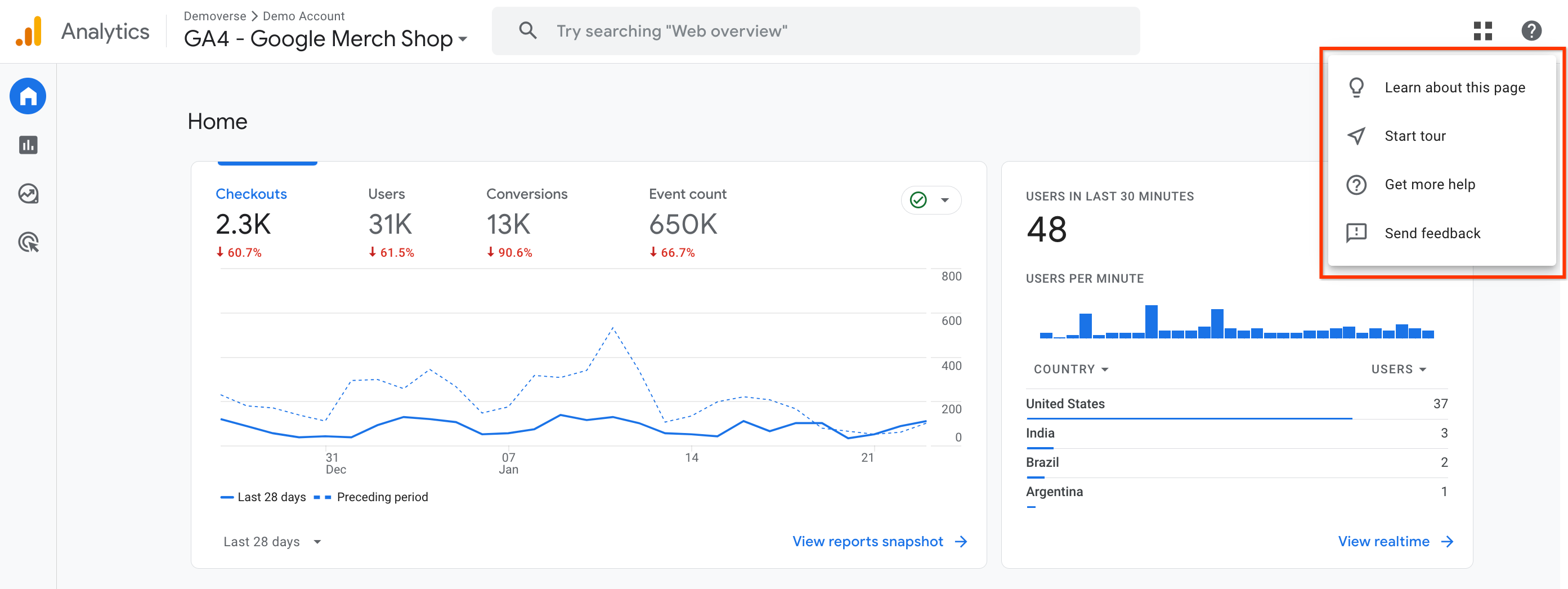
#2: Google Analytics 4 (GA4)
Best for: Post-click behavior and conversion tracking.
Google Analytics 4 (GA4) adds the full picture of user behavior. While Search Console focuses on search, GA4 shows every traffic source, on‑site paths, and conversions.
GA4 also helps track referral traffic from AI tools like ChatGPT or Perplexity, which is vital as AI‑generated answers grow.
#3: Bing Webmaster Tools
Best for: Tracking technical issues and ensuring AI visibility.
Bing Webmaster Tools is often overlooked, but it plays a bigger role, especially now that Bing powers many AI assistants.
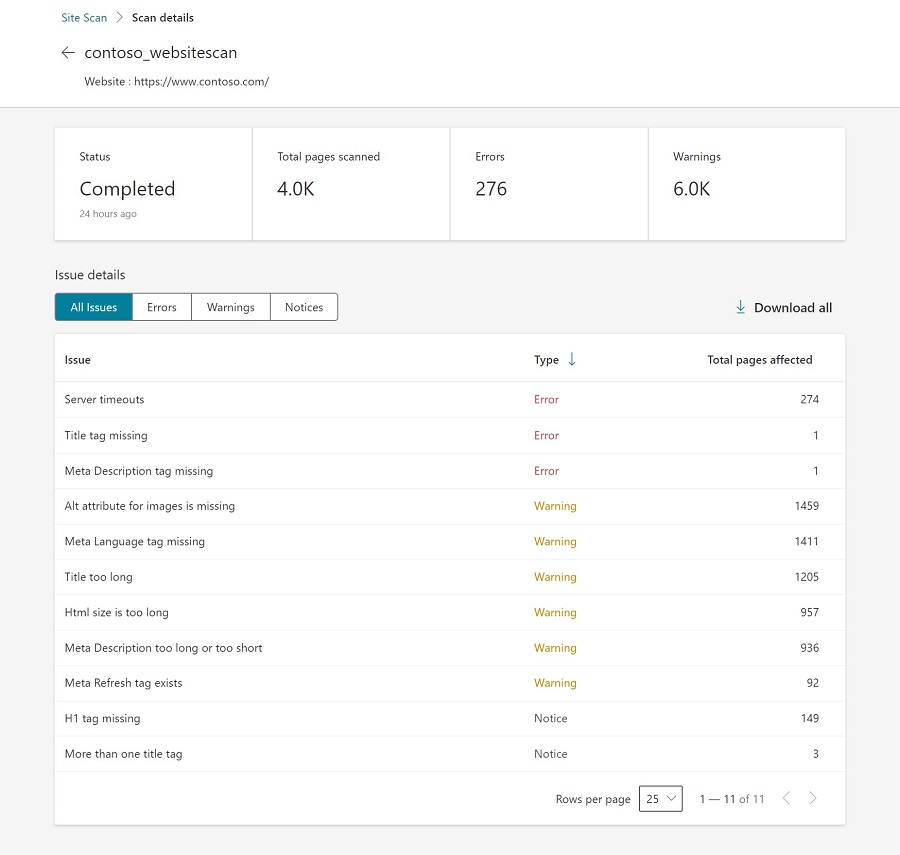
It mirrors much of Google Search Console, with some extra perks such as an easy Site Scan for technical checks that feels like a light SEO audit tool.
Because ChatGPT pulls data from Bing, good performance here can also mean better visibility in AI mentions. The setup is quick, making it a good entry tool for SEO beginners.
Setting up these 3 tools can help you lay the base of a comprehensive SEO analytics workflow, from initial data collection through analysis and reporting.
Best all-in-one SEO analytics platforms for comprehensive insights
Free tools handle a lot, but there comes a point where deeper competitive analysis and smoother workflows are needed. That is when an all‑in‑one SEO analytics platform starts to pay off.
These SEO tools often replace several point tools at once, bringing keyword research, auditing, rank tracking, and reporting into a single dashboard.
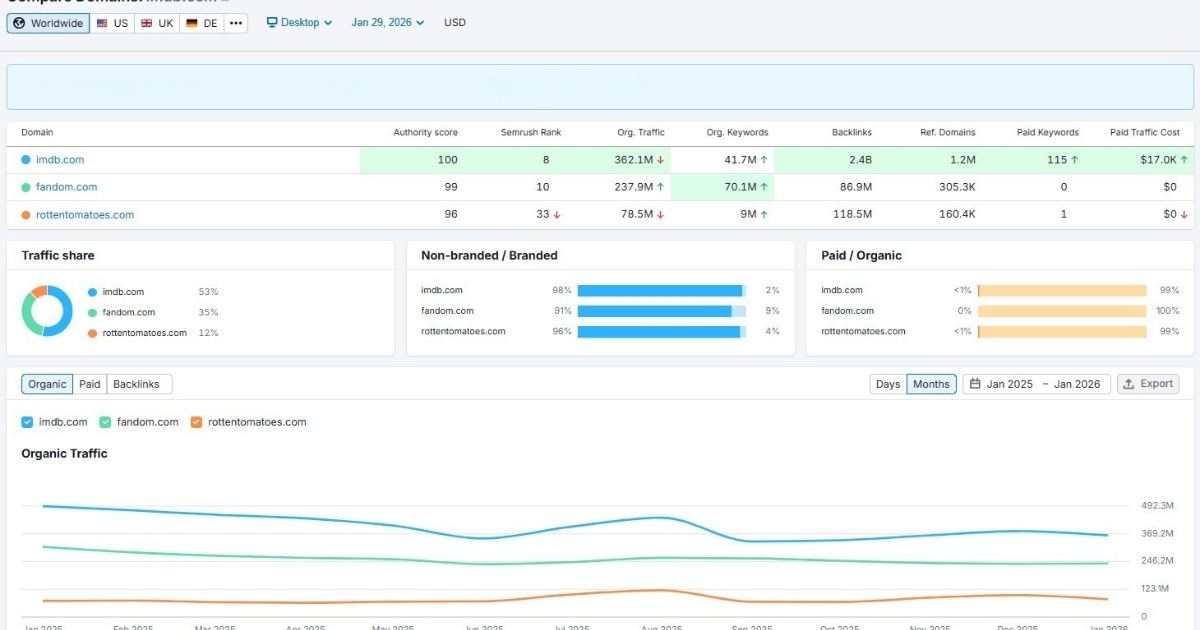
#4: Semrush
Best for: Enterprise off-page and on-page SEO analytics and competitor analysis.
Semrush sits at the high end of the all‑in‑one market and acts like a control center for nearly every SEO task.
It shines for agencies, larger in‑house teams, and SEO specialists who handle many sites and need detailed data. With a large keyword index and strong link data, it doubles as both an SEO analyzer and a competitor website analysis tool.
Key strengths include:
Extensive keyword database with powerful topic research tools.
AI features such as Semrush Copilot and Personal Keyword Difficulty make search engine optimization keyword analysis faster by pointing out realistic targets for a specific domain.
Visibility tracking for traditional rankings and AI search experiences, which helps teams follow both classic and new types of results.
The tradeoff is the learning curve and the price. New users may need a couple of weeks to feel comfortable with the interface, while the tool may not be particularly lucrative for startups or freelancers on a budget.
Pricing:
7-days free trial with limitations. Paid plan starts at $199/month.
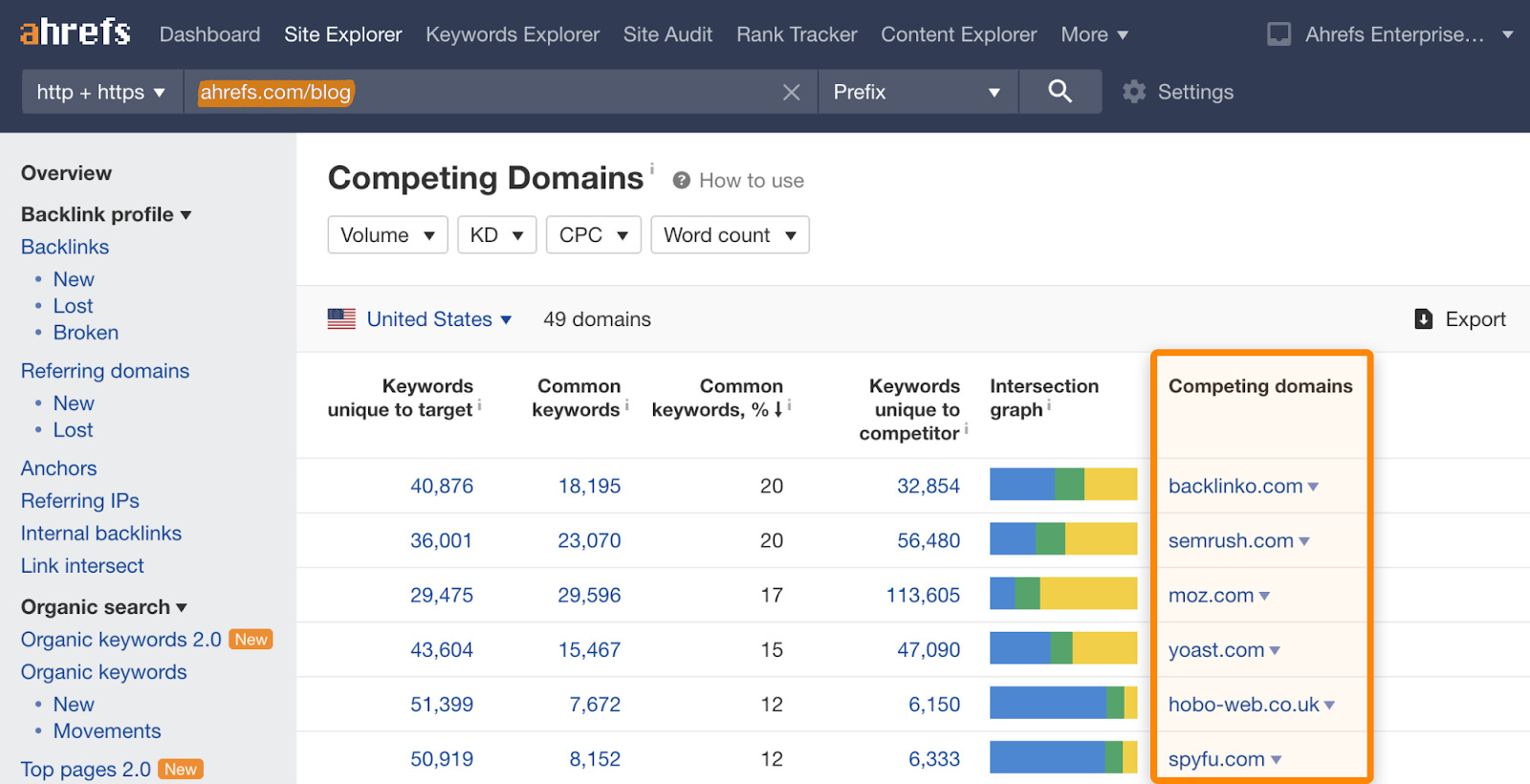
#5: Ahrefs
Best for: Backlink analytics and competitor research.
Ahrefs is widely known for having one of the strongest backlink indexes on the market. For link‑focused campaigns and deep competitor work, it is often the first paid SEO analytics tool professionals consider.
The Site Explorer module offers a comprehensive view of competitors’ pages, keywords, and links in a clean, simple layout.
Its main strengths are:
Backlink data that supports serious link building and online PR campaigns.
Keyword research with difficulty scores and click‑through estimates makes SEO analysis more practical.
The AI Content Helper checks topical coverage and points out gaps in content drafts.
Many users also trust Ahrefs for early signals of new rivals in a niche, thanks to its steady crawling. It is not cheap by any means, but it is mostly accurate in its analytics data.
Pricing:
No free plan available. Pricing starts at $129/month.
#6: SE Ranking
Best for: Scalable rank tracking.
SE Ranking aims to give agencies and growing teams a strong feature set without enterprise‑level pricing.
It covers keyword research, auditing, backlink data, and reporting, but is best known for accurate rank tracking and client‑friendly reports. Its project‑based layout also makes it easy to manage many sites at once.
Notable features include:
Accurate rank tracking with flexible grouping and tagging.
The AI Overview tracker, which watches how often a site appears inside Google’s AI‑style summaries.
White‑label reports and lead‑generation widgets that support agency growth.
For many teams, SE Ranking is the most practical SEO analytics platform when price and features are both crucial.
Pricing:
14-day free trial. Paid plans start from $129/month.
#7: KeySearch
Best for: Budget-friendly SEO analytics.
KeySearch is a budget‑friendly pick for people just starting with SEO analytics. It delivers many features of larger suites at a much lower price, helping new businesses move past the guesswork and gain better visibility in SERPs and AI overviews.
Users get:
Keyword research with difficulty scoring.
Light competitor checks that point out what similar sites rank for.
Basic rank tracking and a simple content assistant.
KeySearch works well as a first paid SEO analytics tool for people who want more than a single Google keyword analysis tool but are not ready to commit to Semrush or Ahrefs yet.
The data comes from well‑known sources, and the interface is simple enough. It is not as deep or fast as higher‑priced platforms, but it gets the job done.
Pricing:
Free 7-day trial available. Paid plans start at $24/month.
Performance and diagnostic SEO analytics tools for better growth
All‑in‑one suites are great for day‑to‑day work, but sometimes a focused SEO analytics tool does a single job far better. Content optimization, full‑scale site crawls, and precise rank tracking are common cases where specialist tools shine.
Let’s see them in more detail.
#8: Contentpen
Best SEO analytics tool for accurate content performance tracking.
Contentpen stands out as an integrated platform that combines AI-assisted writing, SEO scoring, and publishing workflows into one system.
It provides robust analytical features to help you analyze traffic sources across your platforms, along with keyword positions, CTR values, and page impressions.
Key capabilities include:
AI-powered content creation with a built-in AI assistant (Ask AI) to boost readability in blogs while ensuring search engine discoverability.
SEO scoring based on real ranking data that stays updated.
Competitor content comparison to surface quick wins, decaying blogs, and ranking opportunities.
Performance tracking across web, image, video, and news sources for multiple device types.
Date range selection from the last 7 days to 16+ months to view all the essential SEO metrics at a glance.
Contentpen is ideal for agencies, editorial teams, and businesses that want to scale content without scaling tools.
Pricing:
Free trial for 7 days. Paid plans start at $27/month.
#9: Usermaven
Best for: Post-click SEO attribution and behavior analytics.
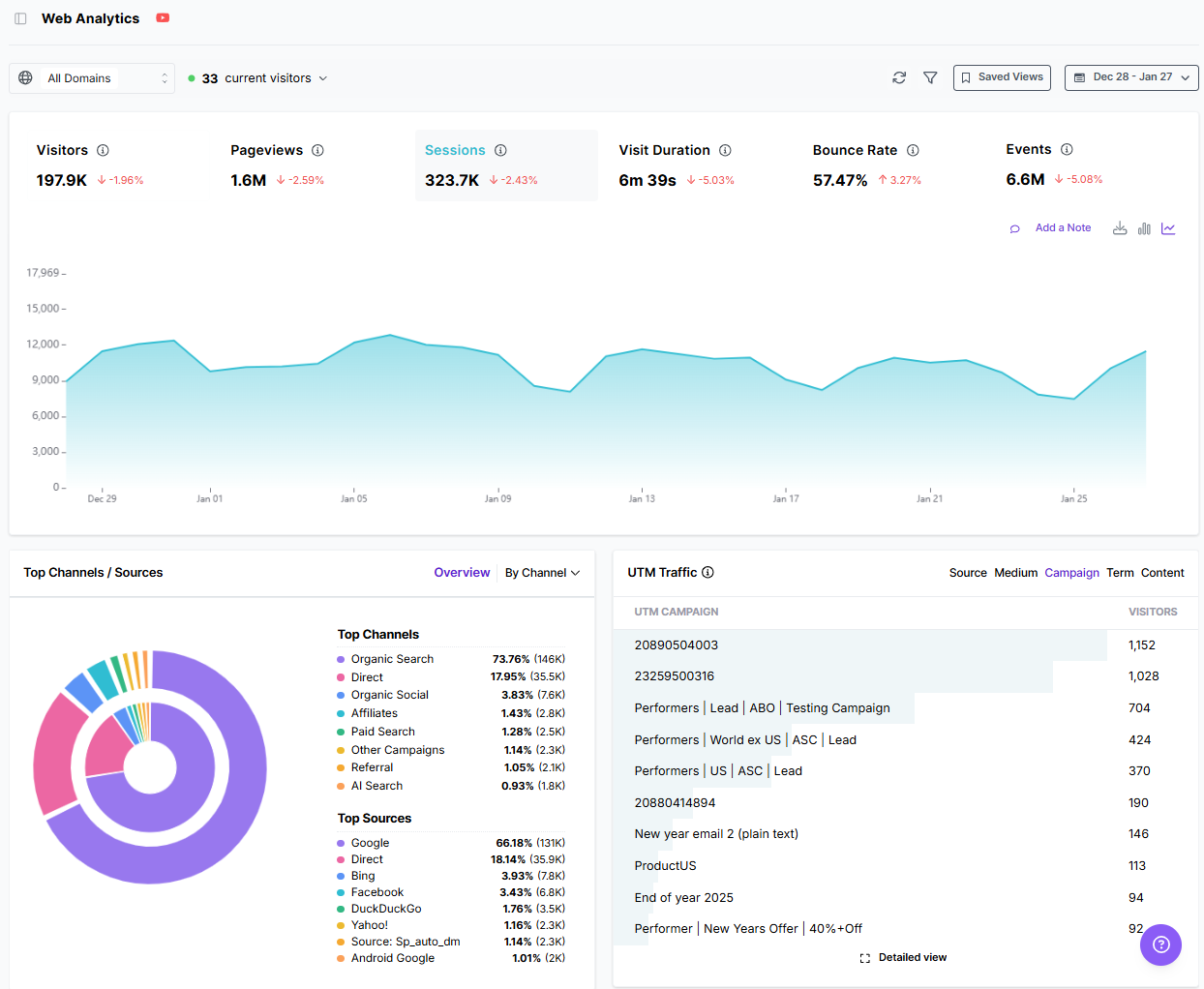
Usermaven is an AI-powered web and product analytics and attribution tool designed as a powerful alternative to GA4. It helps teams track the full customer journey and understand how users behave across pages, funnels, and events, without overwhelming dashboards.
Usermaven is ideal for:
Tracking organic traffic behavior post-click.
Advanced SEO attribution to see where the traffic is coming from.
Segmenting audiences to enable personalized digital marketing efforts.
Maven AI is included to answer analytical queries with ease.
Usermaven’s real-time data access and integration with popular tools, such as HubSpot and Slack, ensure better decision-making and more productivity.
Pricing:
A 14-day free trial is available. Paid plans start at $84/month.
#10: Screaming Frog
Best for: Technical SEO diagnostics.
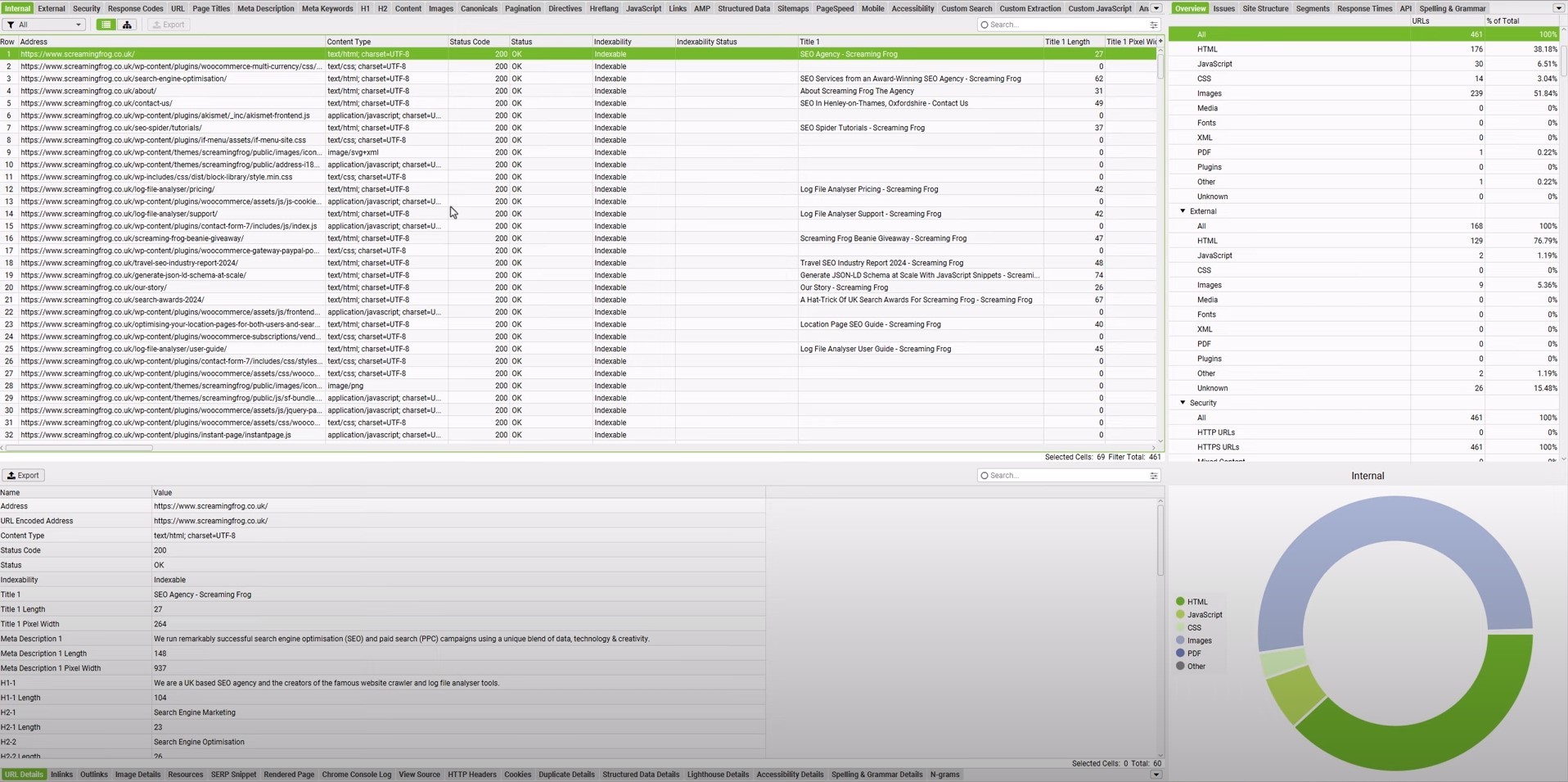
Screaming Frog is a well‑known tool for technical SEO. It is a desktop crawler that scans a site in the same way search bots do. It reports on broken links, redirect chains, thin content, missing tags, and more. For a deep website analysis tool, it is hard to beat.
Typical use cases include:
Spotting broken links on anchor texts and redirect loops.
Checking metadata such as title tags, meta descriptions, and canonical tags.
Finding thin or duplicate content that should be merged or expanded.
Reading the reports requires some basic technical SEO knowledge, especially when using advanced filters. Yet for agencies and seasoned SEO pros, Screaming Frog offers the detail they need.
Pricing:
A free version is available that handles crawling for up to 500 URLs. Price per license for the advanced version is $279/year.
#11: Nightwatch
Best for: Precision rank tracking and local SEO.
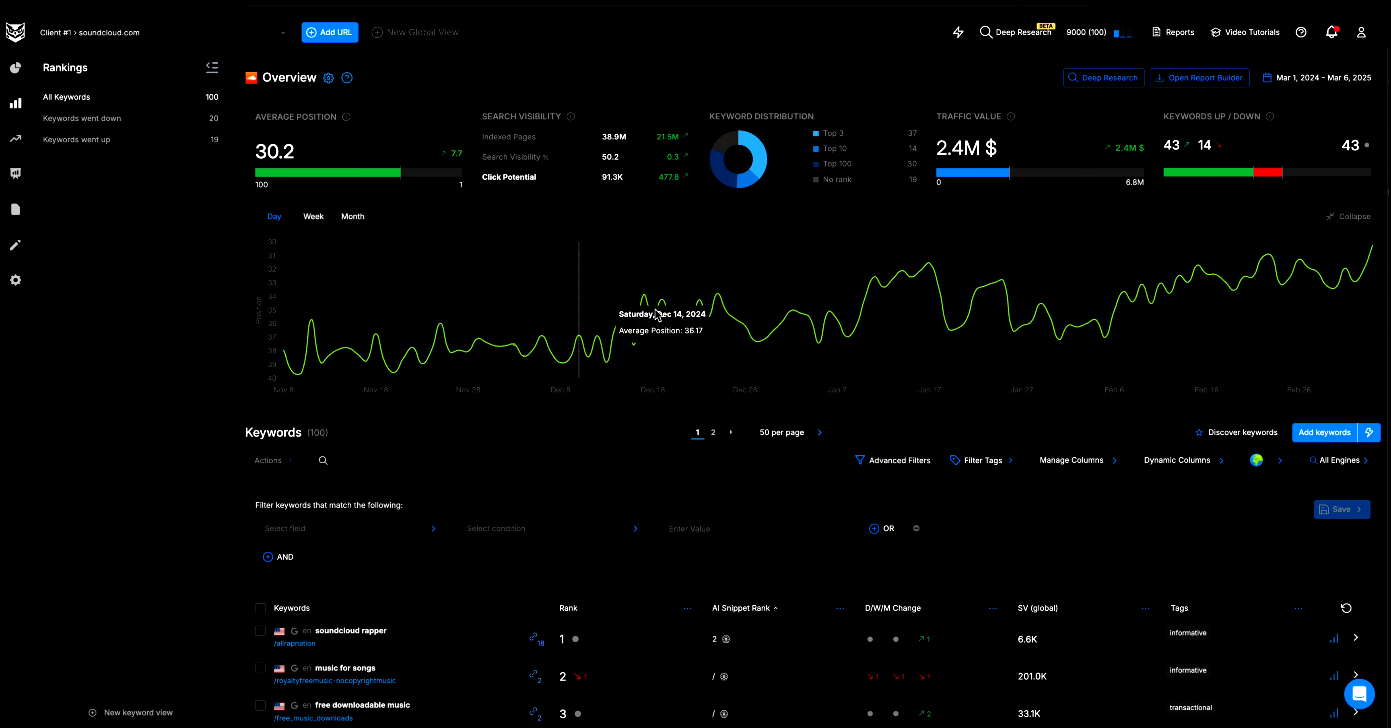
Accurate rank tracking is the backbone of search engine optimization analysis, and Nightwatch is built around that task. It focuses on precision, especially for local SEO rankings across cities or even neighborhoods.
Key capabilities include:
Keyword tracking across famous search engines and AI discovery platforms, such as Google, Bing, YouTube, Perplexity, and ChatGPT.
Zip-code level tracking precision for more than 107,000 locations.
Wide device support, allowing users to track rankings, SERPs, and other numbers on desktop, mobile, and tablet devices.
Integrations with Google Analytics and Looker Studio help tie rankings back to traffic and conversions, while the interface stays clean and modern.
Pricing:
A 14-day full-feature trial is available. Paid plans start at $39/month.
How AI is reshaping SEO analytics (and making it more accessible)
AI has transformed SEO analytics from spreadsheet work into guided, conversational analysis. Instead of manually exporting data and searching for patterns, users now receive summarized insights, prioritized recommendations, and automated workflows.
Artificial intelligence also opens a new front, often called Generative Engine Optimization (GEO). People now find content not only on classic search pages but also through AI systems like ChatGPT, Perplexity, and Gemini.
Therefore, it is now necessary to track mentions for these chatbots with specialized SEO analytics tools, such as SE Ranking. This tool adds its own AI Overview tracking to help users see when they are named in Google’s AI-style sections.
Similarly, our AI writer produces SEO- and GEO-optimized content that aligns with your custom brand voice. The analytics show AI discovery platforms as traffic sources, helping you accurately weigh your content writing efforts.
Final thoughts
An SEO analytics tool is a bare essential in 2026, especially when visibility is desired in both SERPs and AI Overviews. Today, most brands require these specialized SEO tools to beat competitors and drive organic traffic.
Our list covers both free and paid SEO analytics tools to help you choose the option that best fits your needs.
It is always recommended to test these tools before purchasing and to invest in team training and workflow integration to maximize ROI. With proper planning, you can fully utilize the best SEO analytics tools in 2026 and achieve the desired results.
Frequently asked questions
What is an SEO tool used for?
An SEO tool is used to measure search visibility, diagnose ranking issues, track performance, and guide optimization decisions that improve organic traffic.
Can SEO analytics tools help with content creation, or just analysis?
Yes. Modern SEO analytics tools like Contentpen support content planning, optimization, and performance measurement by identifying ranking gaps, search intent, and opportunities to improve existing pages.
Can ChatGPT do SEO?
Yes, it can, but the prompting required for ChatGPT to do so is intense. Better alternatives are available, such as Contentpen for content-driven SEO and Nightwatch for local SEO.
How often should SEO analytics be reviewed?
SEO analytics should be reviewed weekly for performance trends and monthly for strategy adjustments. Sites in competitive niches may require daily monitoring of rankings to see traffic and audience behavioral shifts for better growth.
Click-through rate (CTR) is the ratio of people who clicked your hyperlink to those who saw it.
In SEO, CTR shows how many users clicked through to your page from the SERPs, indicating the success of your content marketing efforts.
This article walks through the CTR formula, provides step-by-step examples for calculating CTR, explains what counts as a good or average click-through rate, and offers specific tactics for improving CTR in real campaigns.
It also shows how smart tools like Contentpen help content marketers and agencies write titles, body content, and descriptions that drive clicks and, therefore, revenue.
So, keep reading on to discover everything about CTR.
What is click-through rate (CTR)?
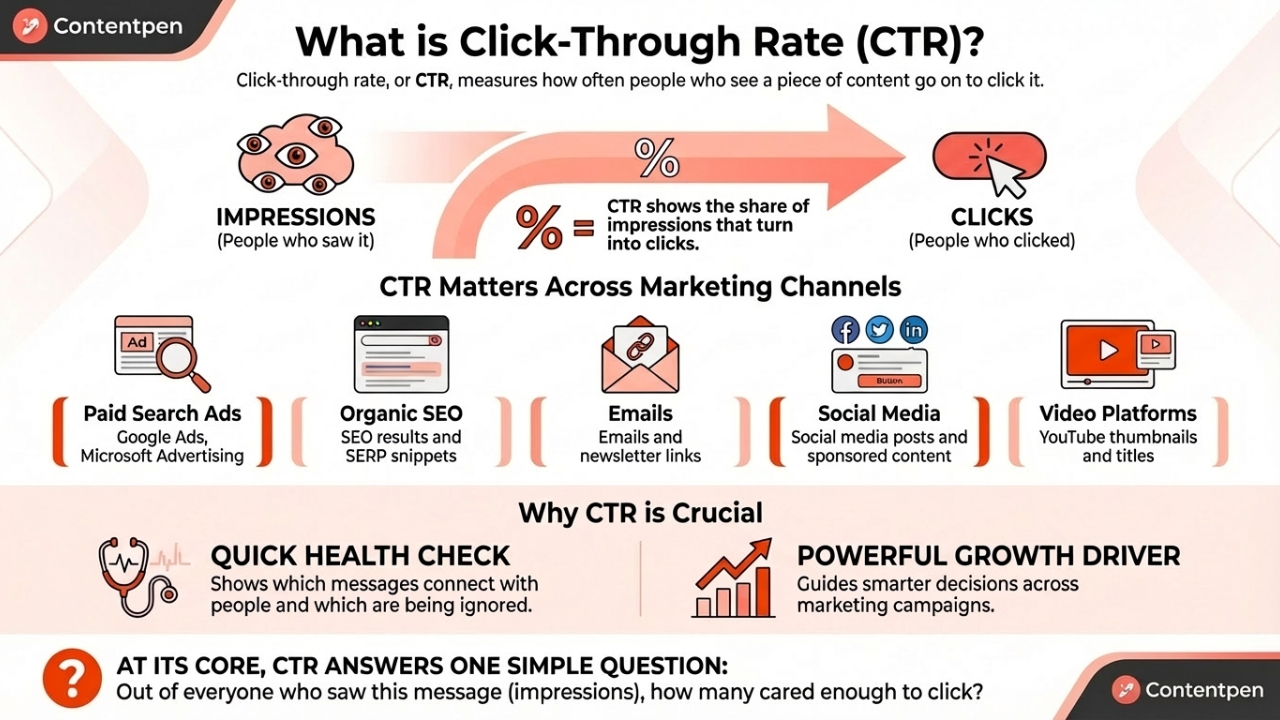
Click-through rate, or CTR, measures how often people who see a piece of content go on to click it. In simple terms, CTR shows the share of impressions that turn into clicks.
Click-through rate matters across almost every channel used in marketing, including:
Paid search ads (Google Ads, Microsoft Advertising)
Organic SEO results and SERP snippets
Emails and newsletter links
Social media posts and sponsored content
Video platforms such as YouTube, where thumbnails and titles drive clicks
CTR serves as both a quick health check and a powerful growth driver for digital marketing campaigns. It shows which messages connect with people and which ones are being ignored.
At its core, CTR answers one simple question: Out of everyone who saw this message (impressions), how many cared enough to click?
CTR is one of those metrics that, once tracked closely, starts to guide smarter decisions across marketing campaigns.
The CTR formula is very simple. No matter which platform is used, calculating CTR follows the same structure.
CTR = (Total clicks ÷ Total impressions) × 100
So, if your ad was seen by 1000 people, and only 20 users clicked on it, then your CTR will be 20/1000 = 0.02 x 100 = 2%.
Even though most platforms calculate CTR automatically, understanding the formula helps spot issues faster and compare performance across channels with confidence.
Is CTR a ranking signal in Google?
No. CTR is not a direct ranking signal for Google. As explained by Google representatives, it shows that a website is well-received by people for a particular search query, but it does not determine exactly where you appear in SERPs.
That said, CTR is a controversial topic in the SEO community. Some experts, like Rand Fishkin, conducted experiments that showed CTR is a ranking factor for Google. This created a lot of buzz among SEO specialists and led to many more debates, but sadly, to no avail.
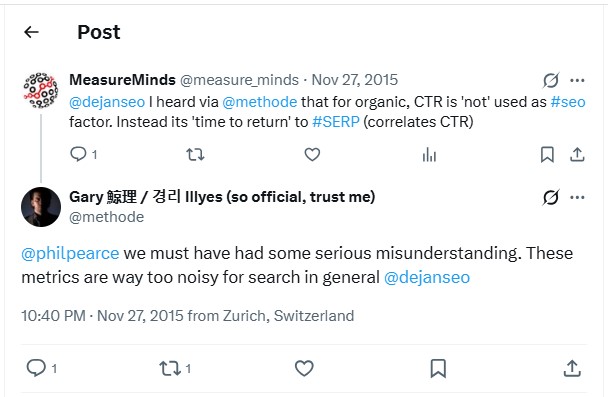
In short, CTR can boost your rankings, but not on all platforms. It is a metric considered too noisy for search in general, as indicated by Gary Illyes in this thread:
Why CTR is critical for your marketing success
CTR is central to marketing because it shows how well ads and content connect with real people. A high CTR signals that the keyword, ad copy, creative, and offer match what the audience wants at that moment. A low CTR points to weak targeting, poor messaging, or both.
In paid search platforms like Google Ads, CTR does much more than show performance. It feeds directly into Quality Score, which is Google’s rating of how relevant an ad and keyword are for users.
One of the main pieces of Quality Score is expected CTR, which is based on how often people have clicked similar ads in the past.
Ad Rank, which decides where an ad appears on the search results page, depends on both bid and Quality Score. In simple form, the relationship looks like this:
Ad Rank = Maximum CPC bid × Quality Score
Because the expected CTR is part of the Quality Score, a higher CTR often leads to a better Ad Rank. This means your ads can place higher for a query without always raising bids.
Beyond auctions and bids, CTR also serves as a quick test of how well keywords, ads, and landing pages align.
For someone searching “emergency plumbing services,” an ad that reads “24/7 Emergency Plumbers Near You” feels like a perfect match and tends to earn a high CTR.
Meanwhile, a generic “Home Repair Deals” ad for the same search query would likely see a poor click-through rate. Watching CTR at the keyword and ad group levels helps you get more leads and revenue.
What is a good CTR? Industry benchmarks and context
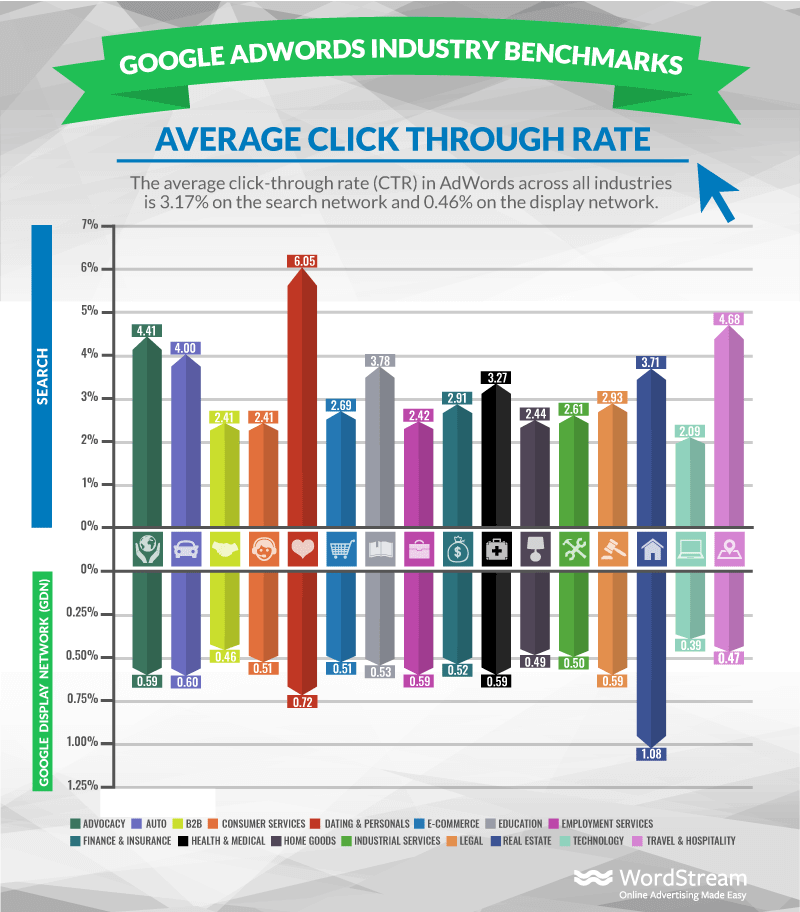
There is no magic CTR number that fits every campaign. The quality of a click-through rate always depends on context, such as industry, channel, device, and the level of competition.
More serious or complex fields, such as insurance and legal services, might see lower numbers than dating and personal services. This is because people often compare more legal or insurance options before purchasing, and so they move slowly through the funnel.
Other factors that influence what counts as a “good” CTR include:
Ad position – The first paid result on a search page captures a large slice of the clicks, while position three or four shares attention with many other links.
Brand vs. non-brand – Branded keywords, such as “Contentpen,” usually have very high CTRs because searchers already have the brand in mind.
Device type – Some local searches do very well on mobile because click-to-call features make action easier, while longer research queries may be more useful for desktop users.
Audience intent – Terms close to purchase (for example, “buy running shoes size 10”) typically earn higher CTR than early research terms (“best shoes for beginners”).
Rather than chasing a single benchmark, the best plan is to compare CTR against industry data and, even more importantly, against the brand’s own history.
Proven strategies to improve your click-through rate
Improving CTR is not about one secret trick. It comes from many small changes that make ads, listings, and content feel more relevant and more helpful.
The good news is that these changes are practical and can be tested quickly.
Refine keyword targeting
One important area is keyword targeting. Building tightly focused ad groups centered on closely related terms allows for very specific ad copy.
So, instead of putting “running shoes” and “dress shoes” in one group, separate them into topical clusters that you can target later on with ease.
This is where Contentpen can help you get started. This SEO platform automatically creates topical clusters, enabling small businesses, agencies, and freelancers drive more clicks with efficient keyword targeting.
Example 1: Running shoes cluster
Keywords: Best running shoes for men, lightweight running shoes, marathon running shoes
Contentpen use: Generate a dedicated article optimized for performance runners, with matching titles like “Best Lightweight Running Shoes for Marathon Training” created with AI.
Example 2: Dress shoes cluster
Keywords: Black dress shoes for men, formal leather shoes, office wear shoes
Contentpen use: Create a tailored blog focused on professional and formal use, with headlines such as “Top Black Dress Shoes for Office and Formal Events.”
By using Contentpen to generate content for each topical cluster, your titles, meta descriptions, and on-page copy become better aligned with user intent.
This makes your listicles, how-to guides, and product update blogs feel more relevant and ready to improve CTR.
Improve ad and content copy
Next comes the ad or content copy. Headlines should echo the words people type into the search bar, since that instantly signals relevance.
Including the key phrase in the headline, such as “Click through rate calculator for agencies,” helps raise CTR SEOperformance for that page.
If you are a service-based or product-based business, consider highlighting:
Free or fast shipping
Same-day or next-day service
Extended guarantees or clear return policies
Social proof, such as ratings or reviews
Clear calls to action, such as “Shop now,” “Get a free quote,” or “Book a demo,” guide users to the next step.
Use ad assets to earn more clicks
Ad assets provide additional ways to win clicks. They include headlines, descriptions, and business details (Name, Address, Phone Number) in your ad, making it more informative without extra cost per impression. Common asset types include:
Sitelink assets – Send people straight to useful pages such as pricing, features, or case studies, which often improves CTR in business campaigns.
Callout and structured snippet assets – Add short benefit phrases and lists that help your offer stand out.
Location and call assets – Let local companies show a map pin or phone number so mobile users can call with one tap.
Image assets – Add visuals that draw impressions for a better chance to earn clicks when several similar text ads appear together.
Testing different combinations of these ad assets often yields quick CTR lifts for your business, helping you get the required clicks quickly.
Align landing pages with ads
Landing page alignment closes the loop. When someone clicks an ad, the page should repeat the ad’s main promise in the headline and body copy. This helps audience retention because visitors quickly see that they are in the right place.
A strong landing experience usually includes:
A headline that mirrors the ad message.
Fast load times, especially on mobile.
Clear layouts with one main call to action.
Content that answers the key questions raised by the ad.
These elements support higher conversion rates, so gains from improving CTR turn into real revenue.
Bringing CTR thinking into content creation with Contentpen
Contentpen fits into this process by weaving CTR thinking into content creation. Its integrated SEO scoring and competitor analysis highlight which keywords, angles, and meta descriptions are more likely to earn a high CTR before a piece goes live.
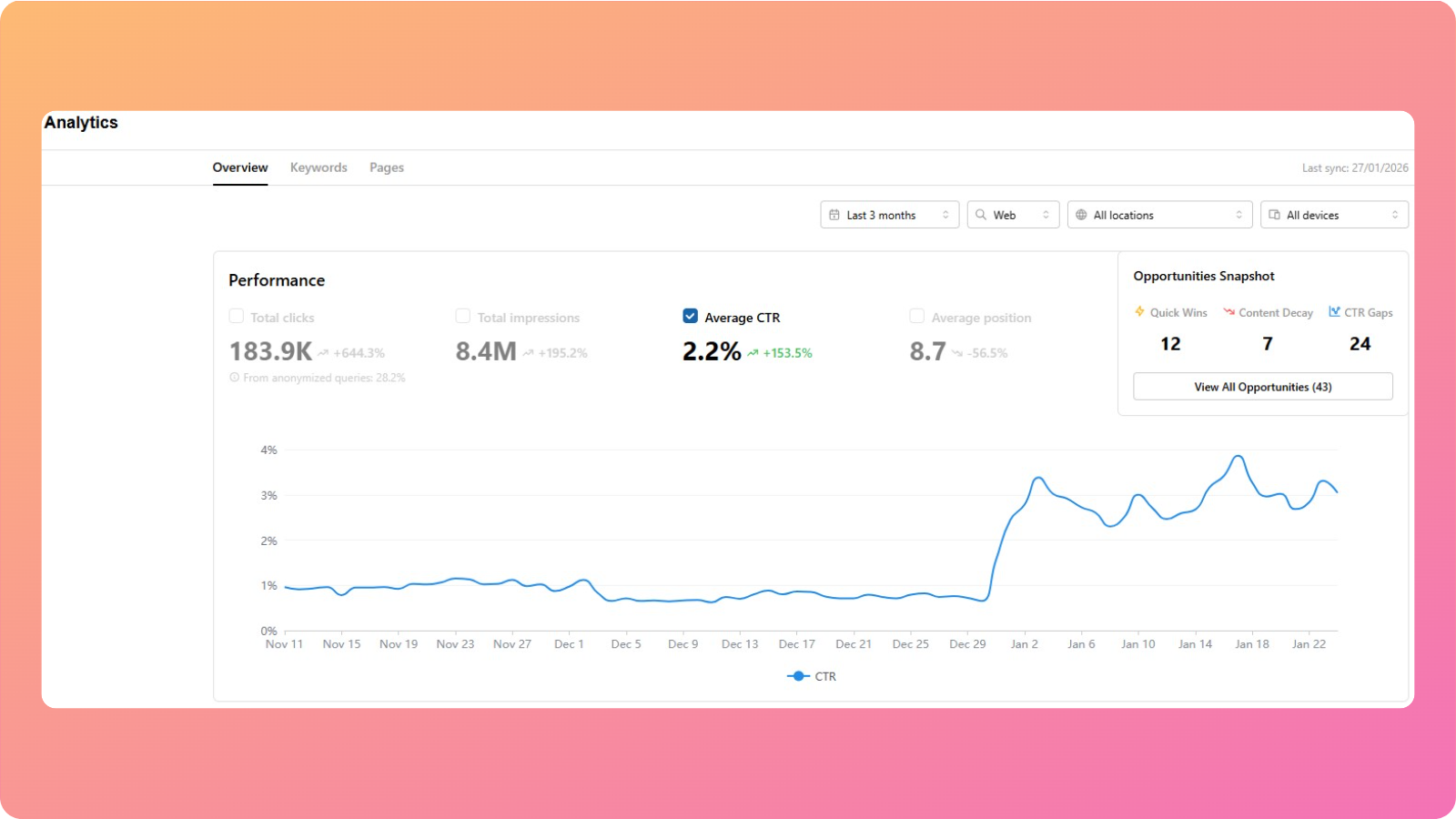
Our AI blog writing tool also works after you’ve published your pieces. The analytics feature helps you view your website’s average CTR, pulling data directly from Google Search Console.
Furthermore, you can dissect CTR by keywords and pages, identify any CTR gaps using the opportunities feature, and act on the AI insights instantly to boost organic clicks.
The tool helps content teams and agencies create click-friendly assets that bring consistent paid and organic traffic over time.
Final thoughts
CTR sits between visibility and action. Impressions show how often people see a message, but click-through rate reveals whether that visibility actually sparks interest or not.
A high CTR often leads to better ad positions and lower costs, while a low CTR signals a problem with targeting, messaging, or both.
Tools such as Contentpen help by integrating CTR SEO thinking into the content workflow, from headline ideas to meta descriptions and body content.
The best next step is simple. Audit the current CTR across channels, identify the lowest performers, and test a single targeted improvement this week. Small, steady gains in CTR can compound into big wins for traffic, leads, and sales over time.
Frequently asked questions
What’s the difference between CTR and conversion rate?
CTR measures the share of impressions that result in clicks, while conversion rate measures the share of clicks that result in a desired action. That action might be a purchase, sign-up, download, or any other goal that matters for the business.
What is the difference between CTR and CPC in marketing?
CTR measures the percentage of impressions that turn into clicks, while CPC (Cost Per Click) measures how much you pay for each click. In CPC marketing campaigns, improving CTR can indirectly lower overall acquisition costs because of stronger customer engagement.
What is CTR in banking?
In banking, CTR stands for Currency Transaction Report. It is a financial document that banks must file when a customer conducts cash transactions above a certain threshold. It is almost similar to CTR in finance, but completely different from the click-through rate in marketing.
Can CTR affect impression share in paid campaigns?
Yes, indirectly. A consistently strong CTR can improve overall campaign performance metrics, allowing ads to compete more effectively in auctions. Better competitiveness can help maintain or increase impression share over time.
Can CTR be too high?
Sometimes an extremely high CTR raises a red flag instead of a celebration. If clicks are very high but the conversion rate is very low, the ad may be attracting the wrong people. This happens when you use overly broad keywords, vague messaging, or clickbait-style promises that attract curious users who never intended to buy or sign up.
How quickly can I expect to see CTR improvements?
Some CTR gains show up almost right away. Changes to ad copy, images, or ad assets can start to influence CTR within a few days, especially in high-traffic campaigns. Other changes, such as restructuring keywords or shifts in Quality Score, often take 2-4 weeks.
Search results feel very different now than they did a few years ago. There are AI summaries at the top and boxes with quick answers that people read.
In 2026, SEO analytics acts as a map that helps you understand this search experience, rather than relying on guesswork. Modern AI tools bring SEO analytics into everyday workflow, making it much easier to see user behavior and boost organic traffic in real time.
By reading this guide, you’ll get a clear picture of what SEO analytics mean, which metrics matter, and how to run a practical website analysis. You’ll also see how built-in analytics in Contentpen help you make smart SEO decisions without complex dashboards.
So, let’s get started.
What is SEO analytics, and why does it matter in 2026?
At its core, SEO analytics is the practice of collecting, reading, and acting on data about how a site performs in organic search. It connects what happens in Google Search and other engines with what happens on the site: traffic, engagement, leads, and revenue.
Old-school reporting focused on vanity metrics like keyword position or total visits. Those numbers can look good on a slide, but they do not indicate the correct user behavior.
Modern SEO analytics goes further. It links website traffic analysis with sign-ups, deals, and customer lifetime value. In tools such as Google Analytics 4, teams can tie organic visits to conversions and see which keywords and pages drive real business.
In 2026, this matters even more because of how search has changed. Google’s AI Overviews mean many searches end without an action. Therefore, competition for the remaining clicks is intense.
To keep up, teams need SEO analytics that show not only where they appear in results, but also:
How often do people choose their snippet
How long visitors stay
How many visitors take action
Without this view, it is tough to prove SEO return on investment or defend budgets.
The most significant shift is that SEO analytics is no longer only an expert sport. Content marketers, freelance writers, and small business owners now use search engine optimization keyword analysis inside their daily tools.
When analytics informs content planning and writing, teams can double down on topics and formats that already work without a second thought.
Essential SEO metrics every marketer should track
Many tools show hundreds of numbers, but only a few should guide decisions. Strong SEO analytics starts with a focused set of metrics that match business goals. These can be grouped into performance, engagement, business outcomes, and technical or authority signals.
Performance
Performance metrics show how visible a site is in search:
Organic traffic trends reveal whether content gains or loses reach week by week.
Keyword rankingsand website keyword rankings highlight where the site stands for target terms and how well it holds featured spots such as snippets or AI Overviews.
Impressions and impression share give context by showing how often the site appears, even when users do not click.
Click-through rate (CTR) links this all together by showing how attractive titles and descriptions are compared with other results.
Engagement
Engagement metrics reveal how well content serves visitors after the click:
Average session duration and pages per session show whether users explore several pages or leave quickly.
Bounce rate and top exit pages highlight where people often give up, which can point to misaligned intent or weak calls to action.
More advanced SEO analytics tools also track scroll depth and interaction events such as button clicks or downloads.
These details help connect search engine optimization keyword analysis with real on-page behavior.
Business outcome
Business outcome metrics speak in terms that leaders and stakeholders care about:
Organic conversions measure how many visitors from search take key actions such as signing up or buying.
Revenue from organic search and customer acquisition cost (CAC) for SEO show how search compares with other channels in a complete search engine marketing analysis.
When SEO analytics is integrated correctly, teams can see whether organic traffic grows while cost per acquisition falls or remains steady.
Technicality and authority
Technical and authority metrics provide the base layer for all the other numbers:
Core Web Vitals scores, page load speed, and mobile usability checks indicate how smooth the user experience is on your website.
Backlink profile health shows how strong the site appears from the outside of your platform.
Index coverage and crawl efficiency reports help teams catch broken links and blocked pages.
A simple dashboard that mixes a few metrics from each group keeps SEO analytics focused. Many AI tools now adjust these dashboards based on your goals so that the most useful web analytics sits at the top.
A helpful rule:
“If a metric never changes your decisions, it’s a vanity metric.”
Therefore, you should focus on the numbers that regularly shape your key objectives and try to improve them for better results.
The four pillars of SEO: Understanding what to measure
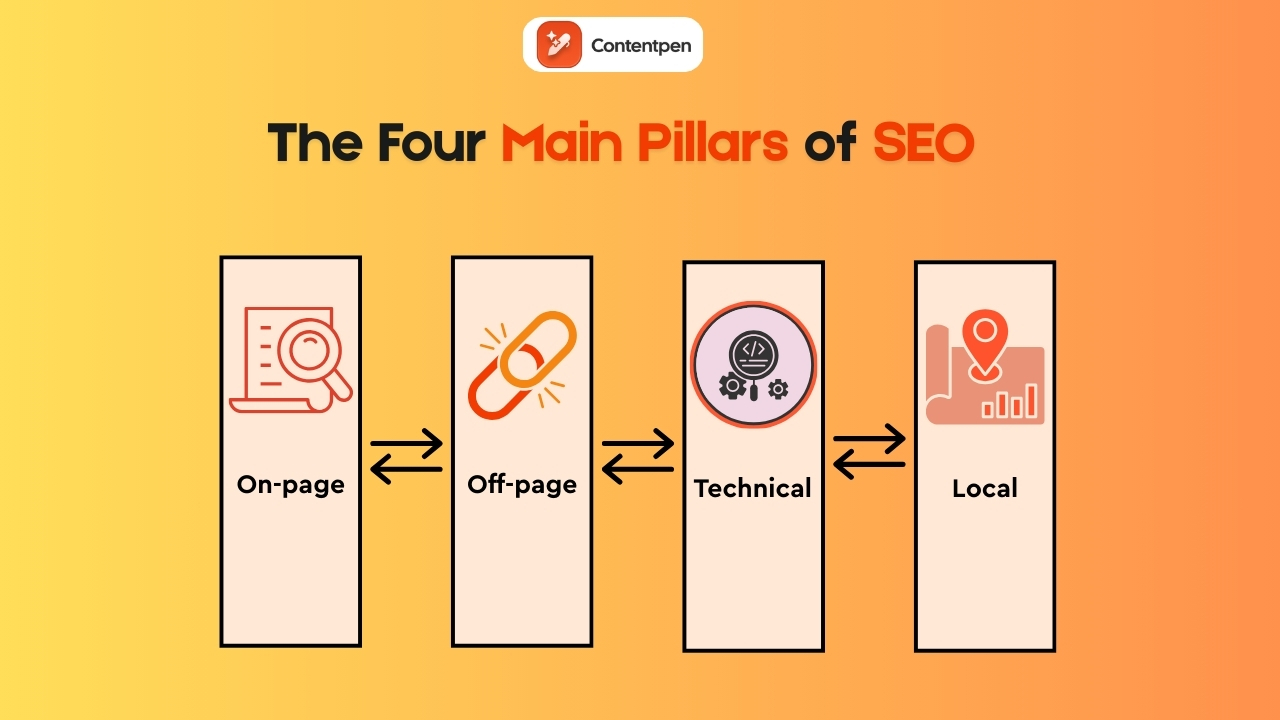
When people talk about SEO, they often mix many different ideas, which makes SEO analytics harder than it has to be. A simple way to think about the work is through four pillars:
Each pillar covers a part of your web page SEO analysis and gives clear targets for what to measure and improve.
On-page SEO
This pillar looks at how each page speaks to both users and search engines. It covers:
Keyword use and topical coverage
Headings and subheadings
Title tags and meta descriptions
Internal links
Content quality and clarity
In SEO analytics terms, key on-page metrics include:
Click-through rate (CTR) from search results
Dwell time and average time on page
Bounce rate
Keyword rankings for each page
These numbers help show which topics and formats hold attention and which ones lose visitors fast.
Off-page SEO
This area covers authority and trust signals that live outside the site. Backlinks, brand mentions, and referring domains all fall under this category. In practice, that means tracking not only how many sites link back, but also how relevant and trusted those sites are.
Off-pageSEO analytics helps answer questions such as:
How strong is our domain compared with direct competitors?
Which content attracts the best links?
Where should we focus digital PR or outreach?
Clear off-page reporting supports smarter link-building efforts and brand visibility.
Together, these four pillars create the measurement framework that modern SEO analytics relies on.
Technical SEO
Even the best content fails if search engines cannot crawl and index it easily. This pillar looks at:
Site speed and Core Web Vitals scores
Mobile usability
Crawl errors and broken links
Index coverage and canonical tags
Good SEO analytics here relies on tools such as Google Search Console for index reports and PageSpeed Insights for performance checks. The aim is simple: remove friction so both users and crawlers move smoothly through the site.
Local SEO
Local SEO analytics matters a lot for physical locations and service areas. Here, teams focus on:
Calls, direction requests, and menu clicks from search
When these numbers improve, it usually shows that the business is winning nearby searches and getting local traffic.
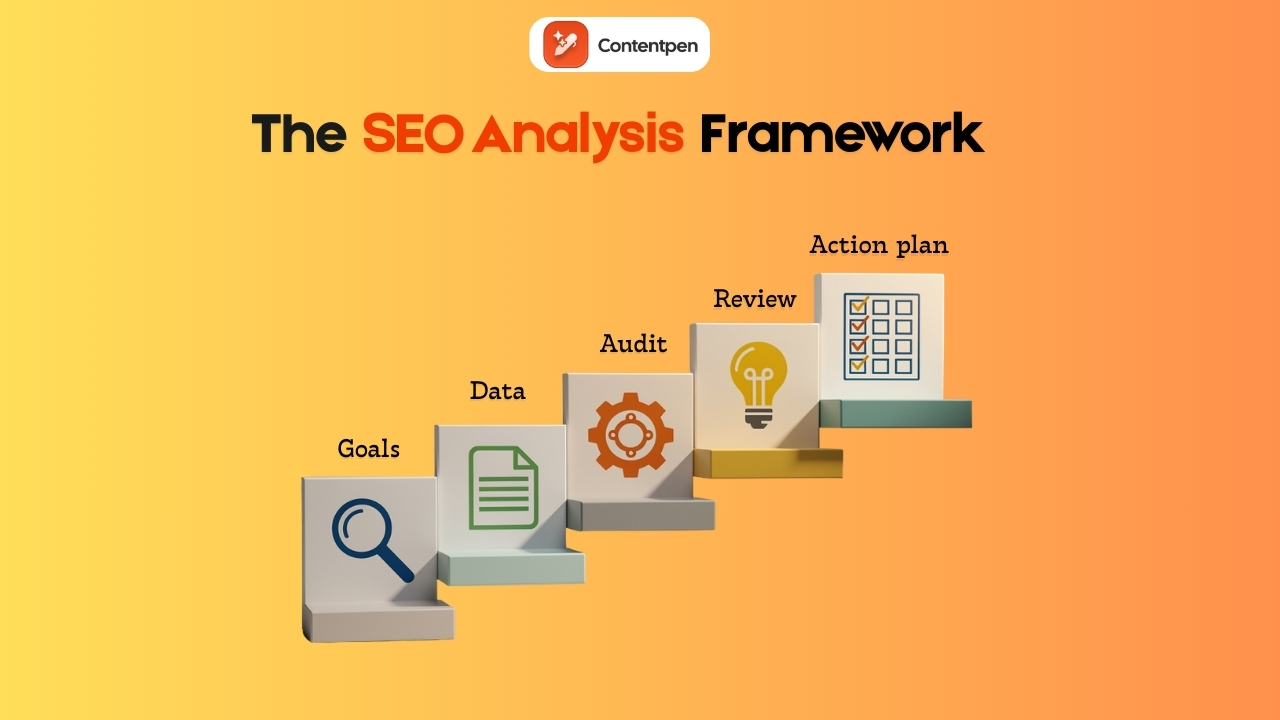
How to perform a practical SEO analysis with a step-by-step framework
Without a clear process, SEO analytics turns into random clicks across charts. A simple framework keeps the work grounded in outcomes rather than noise:
Step #1: Define clear goals
Step #2: Gather baseline data
Step #3: Run a technical health audit
Step #4: Review content performance
Step #5: Turn findings into an action plan
Now, let’s see each of these steps in more detail.
Step #1: Define clear goals and success metrics
Start from business needs rather than rankings. For example, the goal might be to:
Add fifty qualified leads from organic search each month
Increase demo requests by 20%
Grow self-serve revenue from search by a set amount
Once that is clear, pick numbers that match, such as:
Conversion rate
Revenue from search
Key keyword groups that support priority offerings
Write these goals down. These will guide all subsequent decisions and prevent the analysis from drifting from focus.
Step #2: Gather baseline data
Next, collect the data that shows your starting point:
Pull query, impression, and click data from Google Search Console.
Pull traffic, engagement, and conversion data from Google Analytics 4 so that search engine optimization analysis links directly to outcomes.
Use an SEO platform, such as Ahrefs or Semrush, for extra website analysis, current website keyword rankings, and backlink analytics.
Check competitor web traffic analysis and their top-ranking pages, so the team knows the starting point in the market.
Modern AI-driven tools, such as Usermaven, can automate much of this collection, ensuring consistent analytics over time.
Step #3: Run a technical SEO audit
This part of SEO analytics checks for crawl errors, slow pages, and index problems. Tools such as Screaming Frog scan the site in detail to help you surface these issues.
At the page level, this means reviewing title tags, meta descriptions, and performance for key URLs. Once these basics are in place, the content has a fair chance of ranking and converting.
Step #4: Review content performance and find gaps
Look in Google Analytics 4 for landing pages that already drive strong organic conversions and long sessions. Note what these pieces have in common, such as:
Then run keyword analysis and create keyword gap reports across competitors to see which valuable terms they rank for that your site has missed so far.
Use keyword analysis in Google Analytics and Google Search Console together to map search queries to pages and SEO performance metrics. From here, build a list of:
New topics to cover
Existing articles to update
Pages to consolidate if they overlap too much
Step #5: Turn findings into an action plan
Group issues and ideas by impact and effort, then tackle easy, high-impact items first, such as:
Fixing broken technical items on important pages
Refreshing posts that already rank on page one but sit just below the top spots
Improving internal links to high-value pages
Set simple deadlines to start working toward securing top positions on search results and AI discovery platforms. Plan a monthly mini-review and a deeper quarterly review to track progress.
Tools like Contentpen can shorten the process by blending web SEO analysis with content creation. So, writers can see on-page SEO scores, content gap prompts, and best practices while drafting and publishing posts.
Integrating SEO analytics into your content strategy
Strong content strategy starts and ends with data. SEO analytics shows what people search for, which pages they read, and where they fall off. When that information feeds directly into planning and writing, each new piece stands a better chance of ranking and converting.
Let analytics guide content planning
Use keyword analysis and keyword gap data to build the editorial calendar. Focus on topics that mix:
Search volume
Clear intent
Strong business value
Web SEO analysis can also reveal which formats work best in a niche, for example:
Long how-to guides
Quick checklists
Videos
Comparison pages
With this input, teams can decide not only what to write but also how to present it.
Build a feedback loop
Publish content, then watch SEO analytics in Google Search Console and Google Analytics 4 for a few weeks. Check:
The number of queries you receive
Click-through rates
Engagement and conversion metrics
If a page gets strong impressions but weak clicks, improve the title and description. If people visit but bounce fast, rework the intro or adjust the offer.
Schedule regular content audits to update or merge underperforming pages. Over time, this turns content work into a steady cycle rather than random sprints.
Choosing the right SEO analytics tools in 2026
The best SEO analytics tools are not the ones with the most features. They are the ones your team actually uses every day to make better decisions.
In 2026, successful teams build lightweight, goal-driven stacks that connect analytics directly to content, conversions, and growth.
Rather than listing every tool again, this section focuses on how to choose the right SEO analytics setup based on your team’s needs, skills, and goals.
Match tools to your SEO goals
Different goals require different analytics strengths:
Content growth teams need tools that connect keyword insights directly to writing, editing, and publishing.
Revenue-driven teams need analytics that tie organic traffic to conversions, pipeline, and revenue.
Technical SEO teams need deep crawl data, performance monitoring, and index diagnostics.
Local businesses need visibility into map rankings, calls, and location-based engagement.
Strong SEO analytics starts by defining which of these outcomes matter most and choosing tools that serve them well.
A modern SEO analytics stack (simple and effective)
For most teams, a practical setup looks like this:
Search performance layer: Tools that show how your site appears in search and which queries drive impressions and clicks.
Behavior and conversion layer: Analytics that connect organic traffic to engagement, sign-ups, and revenue.
Content and execution layer: A platform that blends SEO analytics directly into content creation, so insights turn into action immediately.
This is where Contentpen becomes the center of the workflow. It is a workspace where SEO analytics actively shape what gets written, updated, and published, without the manual overload.
Quick comparison: SEO analytics tool categories
Tool category
Tool example
Best for
Core SEO analytics role
Typical limitations
Search performance tools
Google Search Console
Visibility tracking
Queries, impressions, clicks, index coverage
Limited content or conversion insights
Web analytics tools
Usermaven
Behavior & revenue tracking
Engagement, conversions, attribution
Weak keyword and ranking context
All-in-one SEO suites
Semrush
Deep SEO research
Keyword research, backlinks, and rank tracking
Heavy, complex, costly
Integrated content + SEO platforms
Contentpen
Content teams
SEO analytics embedded in writing & publishing
Less focus on raw backlink data
This structure helps teams see not just what tools exist, but what role each plays in a complete SEO analytics system.
Keeping brand voice, structure, and optimization aligned at scale
Instead of analyzing first and writing later, teams now analyze while writing, which dramatically shortens the time from insight to impact.
Choosing tools by team type
Here’s how different teams typically structure their SEO analytics stack:
Solo creators & small businesses: Lightweight analytics + Contentpen for writing, optimization, and publishing.
Content teams & startups: Search performance tools + conversion analytics + Contentpen as the central execution hub.
Agencies & enterprise teams: Advanced SEO suites for research and reporting + Contentpen for scalable content production and optimization.
The common thread across all setups: SEO analytics works best when it directly informs content decisions, not when it lives in separate reports.
Advanced SEO analytics strategies in 2026
SEO analytics can move beyond simple reports into smarter, AI-assisted work. The big change in 2026 is that tools no longer just show what happened. Many now suggest the next steps and estimate the impact before changes go live.
How AI is transforming SEO analytics
On the AI side, several capabilities have become common:
Anomaly detection: Instead of a person spotting a sudden drop in traffic weeks later, AI flags the change within a day, often linking it to a specific update, device type, or region.
Personalized keyword difficulty: Instead of one generic score, AI looks at your domain strength, content history, and backlink analytics to judge if a keyword is realistic for your site.
Forecasting: Some platforms can estimate traffic ranges for planned articles, giving teams a sense of likely returns before they invest many hours.
AI-driven topic clustering is another powerful method. Rather than staring at hundreds of phrases, teams can use AI to group them into clear themes or content hubs. Each hub then gets a main guide page with more focused pieces around it.
This approach aligns with how modern search understands topics, making internal linking plans much simpler.
AI can also scan existing pages and give specific on-page suggestions as part of your SEO analytics work, such as:
Improving headings
Adding missing subtopics
Updating outdated facts
This is, however, just a starting point for your smart analysis. You can discover other tools that work well for you and incorporate their suggestions, one at a time, to see if you get the desired results.
Using competitive intelligence to outperform rivals
Competitor analysis is necessary to win a niche and the relevant audience. Here are some of the useful methods used in this regard:
Keyword gap analysis: Highlights terms where several rivals rank but your site does not.
Backlink gap analysis: Lists sites that link to competitors yet ignore your domain, which sets up targeted outreach plans.
SERP feature tracking: Shows which content types (tools, checklists, guides) hold the most share of attention over time.
These tactics fit into broader search engine marketing analysis, helping you secure top spots and greater organic visibility.
Tracking brand visibility in AI-driven search results
A new frontier in SEO analytics is tracking brand presence in AI-driven search, especially as the Google vs ChatGPT market share situation continues to evolve and reshape how users discover information. That includes how often your brand or content appears in:
Accurate, well-structured content that other sources reference
Our AI writing assistant can help here. It guides writers toward clear structure, full coverage of topics, and proper internal and external linking. As a result, your content is more likely to be cited in both classic results and AI summaries.
Common SEO analytics mistakes and how to avoid them
Even strong teams fall into common traps when it comes to SEO analytics. The good news is that these mistakes are easy to fix once they are visible.
Mistake #1: Using too many SEO analytics tools without a clear system
It is tempting to sign up for every free SEO analysis, rank tracker, and site audit. The result is often confusion, since numbers do not match and reports are hard to compare. A stronger plan is to pick a small stack, one that shows clear analysis and no noise.
Mistake #2: Ignoring technical SEO signals in analytics
Some teams publish many articles, yet still struggle because pages load slowly or crawlers hit errors. Regular technical checks, as part of ongoing SEO analytics, catch these issues early.
Fixing speed issues, broken links, and mobile layouts often improves performance across many pages at once.
Mistake #3: Treating SEO analytics as a one-time project
Running a big SEO audit once a year and then forgetting about it means changes in search or on the site go unseen. Therefore, a light monthly review and a deeper quarterly review keep SEO analytics fresh without taking over the calendar.
Also, don’t let SEO sit in a silo. Linking data across tools provides a comprehensive view of search engine marketing analytics and helps demonstrate how organic, paid, and other channels work together.
Summing it up
SEO analytics turns data into a clear action plan for marketers, agencies, and businesses. In 2026, AI summaries, rich results, and changing user habits make simple rank reports far too shallow.
The main message is simple. You don’t need deep technical expertise for SEO analytics, but you do need a more innovative approach to improve rankings. Use the right tech stack and have a step-by-step framework to keep the four main pillars of SEO aligned.
The real edge comes from steady, small improvements. Run regular reviews, update existing content, and try one or two advanced tactics as the team grows. With this approach, SEO becomes a strong driver of growth for your brand.
Frequently asked questions
What is SEO analytics full form?
SEO analytics stands for search engine optimization analytics.
Is SEO analytics free?
Yes. You can perform SEO analytics for free using tools like Google Search Console and Google Analytics 4. Paid tools offer deeper insights, but free tools are enough to start.
Where can I get an SEO audit report?
You can get an SEO audit report from tools like Google Search Console, Ahrefs, Semrush, AIOSEO, or Screaming Frog. Many platforms also offer instant online audit reports for free.
What is the difference between SEO analytics and web analytics?
SEO analytics focuses only on organic search traffic, meaning how people find your site through search engines and what they do afterward. Web analytics covers all traffic sources, including paid ads, social media, email, and direct visits.
How often should I perform SEO analytics reviews?
Most sites should check key metrics weekly for sudden changes, review performance monthly for trends and content updates, and run a deeper content strategy review quarterly. This keeps SEO decisions timely without becoming overwhelming.
How do I know if my SEO analytics efforts are working?
Your SEO analytics is working if organic traffic leads to more conversions, the CAC from search stays stable, and you can clearly connect rankings to business outcomes. If rankings rise but revenue doesn’t, your analytics strategy needs adjustment.
The gap between great content and real visibility almost always comes down to search engine basics.
Search engines sit between almost every question and almost every click. Studies show that over 80% of online experiences begin with a search query. When users discover and understand a page, traffic starts flowing. When they do not, even the best ideas stay hidden.
Search engines can seem mysterious and deeply technical, yet the core ideas are simple enough for any marketer, writer, or founder to grasp. Once those basics click, terms like crawling, indexing, and ranking stop sounding like jargon and start feeling like a clear checklist.
By the end of this guide, you will understand what does a search engine do, why that matters for business growth, and how to apply SEO fundamentals in a practical way.
So, let’s get started.
What is a search engine, and why does it matter?
A search engine is a web-based tool that helps people find information on the Internet. It does not scan the live internet from scratch every time someone types a query. Instead, it searches a massive prebuilt database of pages, often called the index, and uses algorithms to decide which ones to show.
This difference between the index and the live web sits at the heart of search engine basics. When you type a keyword, you are really asking the search engine to look inside its index and return the best matches.
As of 2025, Google’s index alone contains information from billions of pages and occupies well over 100 million gigabytes in size across many data centers.
For a business, that index is where visibility lives. If a page is not in the index, it cannot appear in results at all. If it is in the index but looks weak or unclear to the algorithm, it will sit many pages deep, where almost nobody clicks.
That is why search engine optimization focuses so heavily on making pages easy to understand and appealing to search engines.
Different search engines use different indexes and algorithms, which is why Google and Bing’s results may vary for the same query. This is demonstrated in the statistical analysis of the search engines study, which compares major search platforms side by side.
For marketers and content teams, understanding the split between index and algorithm makes SEO planning easier.
How Google search engine works step by step?
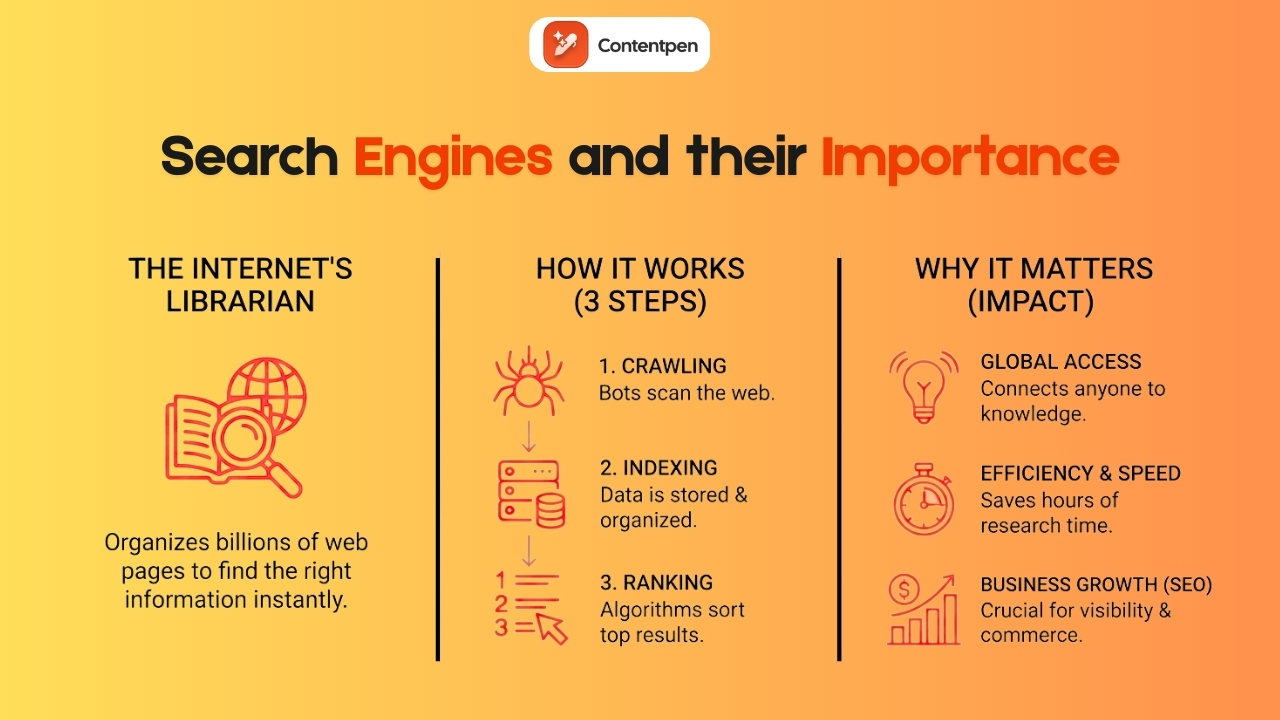
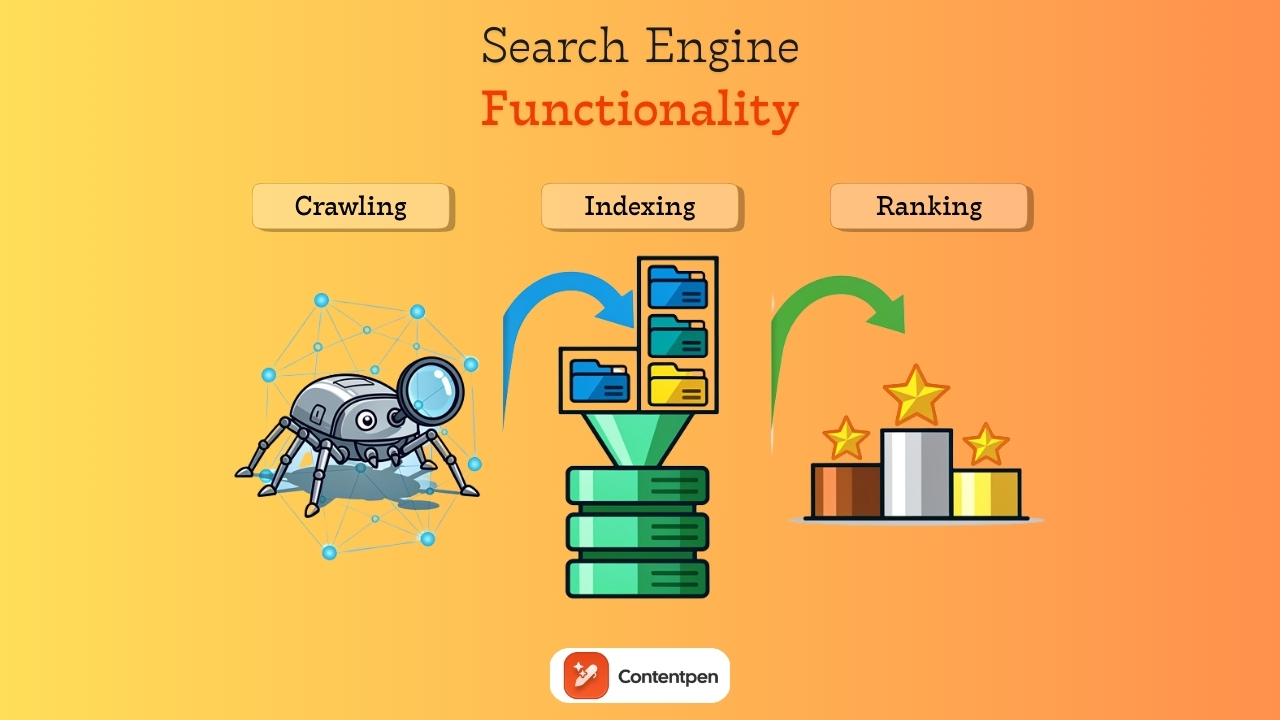
Every page that appears in a result goes through the same three‑stage process: crawling, indexing, and ranking (or serving). Google’s in-depth guide to how a search engine works provides official documentation on each phase.
To put it briefly, the three stages function as:
Crawling – Discovery, where bots follow links and read pages.
Indexing – Organization, where those pages are analyzed and added to the database.
Ranking and serving – Decision, where the engine matches a query to the best pages it already knows.
This process never stops. Crawlers revisit sites, indexes update, and rankings shift as content changes, links appear, and user behavior moves.
Not all pages make it through each stage. Some never get crawled, some are crawled but not stored, and some are indexed but rarely or never shown.
Here is a breakdown of those stages in the table below.
Stage
What happens
Key question for you
Crawl
Bots discover URLs and fetch page content
Can search engines find and reach your pages?
Index
Systems analyze content and add it to the search database
Is your content clear and of high enough quality?
Serve
Algorithms match queries to indexed pages and order the results
Does your page look like the best answer?
When you hear people talk about search engine basics or SEO for beginners, they are usually talking about how to help a site move smoothly through this path. Technical SEO covers crawling and indexing, while on-page and off-page SEO influence how pages perform in the serving stage.
Step #1: Crawling – How search engines work to discover your content?
Crawling is the stage where search engines learn that your pages exist. Since there is no master list of all URLs on the internet, engines use automated programs called crawlers, bots, or spiders to follow links and fetch content. Google’s crawler is often called Googlebot.
These crawlers start with known URLs, fetch pages, and discover new ones by following links, gradually mapping the web over time.
In simpler words, crawling in a search engine is the raw data‑gathering step. For any business that cares about SEO basics, this is where visibility starts.
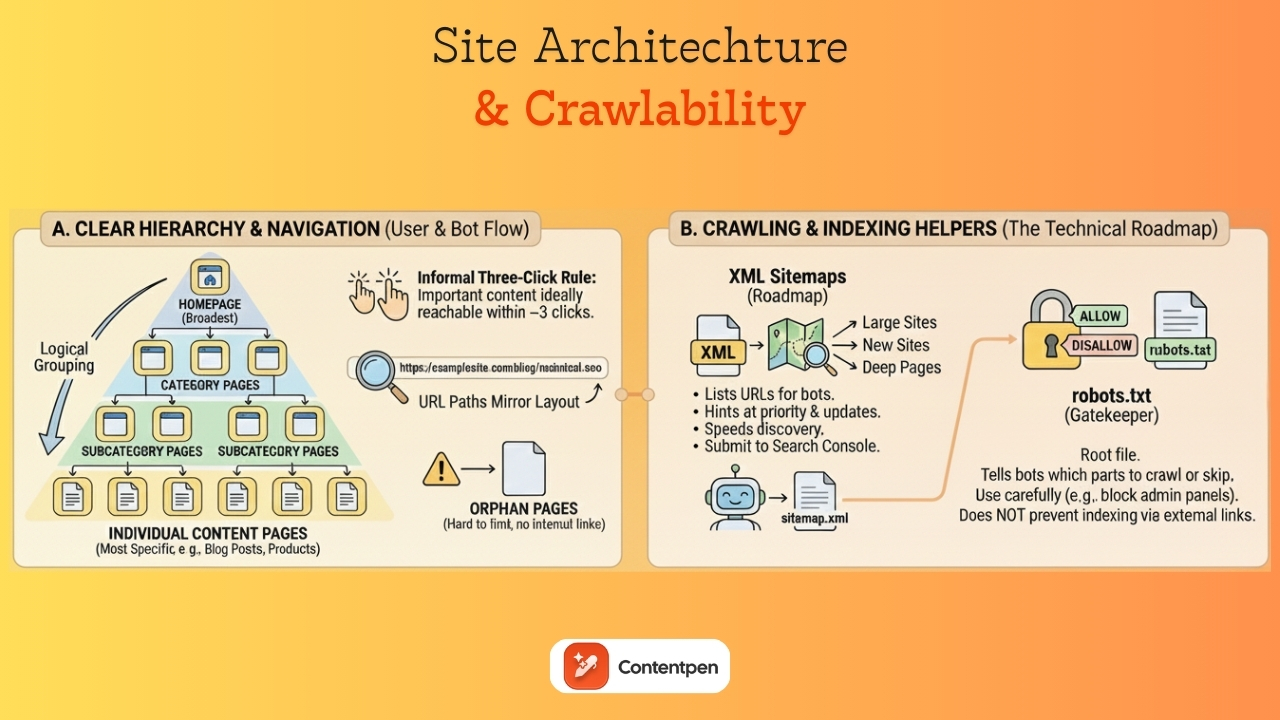
How crawlers find pages with links and sitemaps
Crawlers rely on two main pathways to find content:
Internal links that connect one page to another
Sitemaps that act like a directory you hand to the search engine
Internal and external links are the path crawlers prefer most of the time. When a crawler lands on a page, it looks through the links in the HTML and adds new ones to its to‑visit list. That means your internal linking structure matters a lot, because pages that are buried with no links pointing at them are much harder for bots to discover.
When you make sure important pages are linked from menus, category pages, and other high‑traffic content, you help crawlers find and revisit those key URLs.
Sitemaps provide a second line of help. An XML sitemap lists important pages and optional details such as last-modified dates. Many modern content platforms can generate this file automatically, making it easy for teams without advanced technical skills to rank.
When you submit that sitemap through tools like Google Search Console, you give crawlers a direct map of what matters on your site. Using both methods together is far stronger than relying on only one.
Frequency rendering and limitations with crawlers
Crawling is not random. Search engines decide how often to visit each site, how many URLs to fetch, and how deep to go based on several signals.
Important factors include:
Popularity – Pages and sites that attract many links and visits tend to get crawled more often.
Update habits – A news site that publishes multiple times a day sends a clear signal to crawlers to return often, while a static brochure site might be checked far less often.
Technical health – Clean site structure and fast server response let crawlers fetch more pages without strain.
Modern crawlers do more than read HTML. Googlebot, for example, can render pages with a headless browser similar to Chrome. That means it can run JavaScript, load dynamic content, and see most of what a human visitor sees. This is very important for single‑page apps and sites that depend on scripts for core content.
Crawling still has limits. Robots.txt files can block entire folders or an entire site if misconfigured. Pages behind logins or paywalls are off‑limits.
Also, orphan pages with no internal or external links may never be found, and slow or error-prone servers can cause crawlers to back off.
Step #2: Indexing — How do search engines work to organize and store information?
Indexing begins after a page has been crawled. At this point, the search engine tries to understand the content and decide where and how to store it in the index.
During indexing, the engine processes text, layout, links, and structured data. It records which words appear, which phrases stand out, and how the content is organized with headings, lists, and other markup.
It also looks at signals such as language, country targeting, and mobile readiness, all of which are now considered important ranking factors.
What information gets stored in the index
When a page is indexed, the system does not keep just one flat copy of the text. It stores several kinds of information that help with matching and ranking:
Words and phrases – Which terms appear on the page, how often, and in which positions. Titles, headings, and early paragraphs carry more weight than text in footers.
HTML and metadata – Title tags, meta descriptions, header tags (H1, H2, H3), and image alt text all provide clues about the topic. Schema markup can describe products, events, articles, How-to guides, etc., in a much more structured way.
Broader signals – Primary language, likely geographic focus, freshness, mobile friendliness, and engagement patterns for similar pages. Over time, backlink information and user interactions also contribute to the stored profile for that URL.
Common filler words, often called stop words, are sometimes ignored to save space and make indexing more efficient.
Canonicalization and managing duplicate content
The web overflows with near‑duplicate pages. The same content can appear at multiple URLs because of tracking parameters, print views, mobile versions, or simple copy‑paste behavior. Search engines need a way to sort through these clusters so that results are not filled with duplicate pages.
Canonicalization is the process of selecting a single version from a set of duplicates. The engine tries to find the best representative page and treats that URL as the primary one for ranking purposes. Other versions are still noticed but are treated as alternates.
Duplicates can arise for many reasons. For example:
An online store might show the same product under different categories with different URL paths.
A blog might have both www and non‑www versions, or show the same article with and without tracking codes.
Sometimes mobile and desktop versions live on separate subdomains.
You can help the engine choose the correct page by using canonical tags.
A rel=”canonical” tag in the HTML head points to the preferred URL for that content.
When used well, this tag keeps link equity from splitting across many copies and makes ranking signals clearer.
Common indexing problems and fixes
Even when crawling looks healthy, pages can fail to make it into the index. Most of the time, this comes down to content quality, blocking rules, or site structure.
Thin content – If a page has only a few lines of text or feels spammy, search engines may mark it as crawled but not indexed.
Noindex directives – Meta robots directives such as noindex are useful on thank‑you pages or admin areas that should be excluded from search results. Problems arise when they end up on important pages by mistake during a template change or redesign.
Complex architecture and heavy JavaScript – If key content only appears after user actions, or if the HTML structure gives little hint about the topic, the engine may struggle to understand the page.
Creating helpful content is usually the most reliable long‑term fix for businesses and platforms of all types. However, not all businesses can generate such content or create such user experiences.
Which is why you need tools like Contentpen to help. It automatically generates high-quality, beautifully structured SEO and GEO-optimized content at scale while handling internal and external linking.
The best part is that this SEO platform also supports integrations to your favorite CMS platforms, such as WordPress, Ghost, Wix, and others. So, you don’t need to switch tabs when publishing content and always meet your deadlines.
Step #3: Serving results — How search engines work to decide what you see?
Ranking and serving is the stage most people notice. It is what happens after someone types a query into the search box and presses enter. The search engine now has to choose which of its billions of indexed pages to show and how to order them.
The process starts with query processing. The system parses the user’s input, infers intent, converts words into its internal numerical form, and compares it against the index. It looks for pages that match not only the literal keywords but also related concepts and common patterns for that type of search.
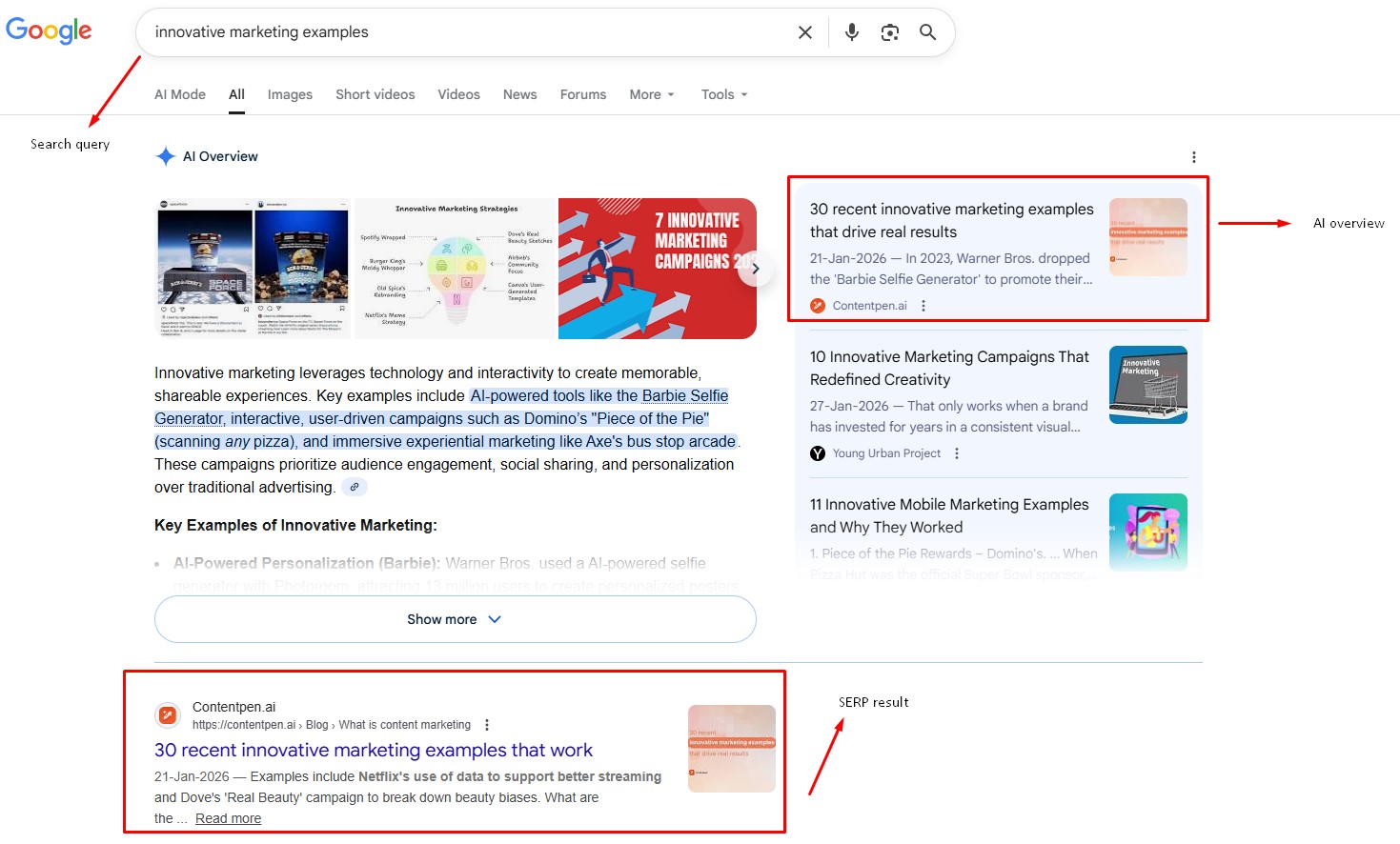
The results appear on the Search Engine Results Page (SERP). This page can include standard blue links, local map results, image carousels, videos, product cards, and featured snippets that try to answer the question right away. The layout changes based on what the engine believes the searcher wants in that moment.
Behind the scenes, hundreds of ranking factors influence which pages rise to the top. These factors fall into groups such as relevance, content quality, authority, user context, and technical health.
Query processing from the search box to the results
When a query comes in, the search engine first cleans and interprets it. It may correct spelling, expand abbreviations, or guess that certain words form a known phrase. Then it converts that processed query into the same kind of numerical tokens used in the index.
Next, the engine uses math to compare the query tokens with the tokens stored for each page. It looks for close matches, related terms, and patterns that signal a strong answer. This matching step happens extremely quickly.
Search operators give users more control when searching for specific information. Typically, this is how to use search engine for routine tasks in a daily workflow:
Search operator
What it does
Example
“”
Search for the exact phrase that mentions this word or phrase
There are many more search operators you can use to narrow results and find the information you need quickly.
These operators, mainly Site: and “”, are useful for competitive research, content audits, and technical checks. These also help you see how many of your pages are visible to the audience, and which require your attention for editing.
The main ranking factors and what really matters
While search algorithms use hundreds of inputs, many of them boil down to a few main themes. If you keep these in mind while planning content and technical work, you can cover most of what matters for search engine optimisation basics:
Relevance – Does the page match the searcher’s intent and query? Pages that repeat a phrase without real depth often lose out to pages that answer questions in a clear, thorough way.
Content quality – Search systems look for signs of expertise, author bylines that make sense for the topic, clear sourcing, and original thought. They pay attention to grammar, readability, and structure because those details affect how helpful a piece feels.
Authority – This flows mostly through links. A strong backlink profile includes links from relevant sites, a natural mix of anchor text, and steady growth over time.
User context and experience – Location, language, device type, and past behavior all influence which results someone sees. Technical factors such as page speed, mobile readiness, HTTPS, and clean site architecture also matter.
You cannot buy higher organic rankings.
Paid ads can give a site visible placements marked as sponsored, but the main results depend on how well the algorithm scores your pages across all these areas.
What you can do, instead, is focus on SEO basics rather than looking for shortcuts.
How SERP features change based on search intent
The SERP format shifts based on what the engine believes the user wants, often referred to as search intent.
For local intent searches, such as pizza near me, the SERP often shows a map with nearby businesses, star ratings, and quick buttons to call or get directions. For these searches, local SEO basics and a strong Google Business Profile matter a lot.
For informational intent searches, such as how to write a blog post, you may see a featured snippet at the top that pulls a short answer from one page. In this case, clear headings, direct answers, and well‑structured content can help you earn the top spot.
In commercial intent searches, such as best SEO competitive analysis tools, review snippets, and product grids often appear. Comparison content, rich product data, and honest reviews do well here.
For navigational intent searches, such as Contentpen login, results mostly show brand pages that help users quickly reach a specific site.
Studying these types of search intents before picking target keywords is a smart move. It shows what kind of content Google expects for each phrase and gives a clearer sense of how to shape your own pages for better SERP and AI Overview visibility.
How to optimize for search engines with SEO fundamentals
Good search engine optimization basics rest on three pillars:
Access – Crawlers need clear paths and fast responses.
Clarity – Algorithms need well‑organized, helpful content.
Authority – Users and other sites need reasons to trust and recommend your pages.
Now, let’s see each of these aspects in more detail.
Crawling optimization to ensure content discoverability
Crawling optimization focuses on making your site easy and safe for bots to explore. Even small steps here can lead to better coverage.
Create and submit XML sitemaps. Many content management systems automatically generate these files that list key URLs. By submitting them to GSC, you give crawlers a clear overview of your site.
Build a clear internal linking structure. Every important page should be reachable within a few clicks from the home page, ideally through logical category and subcategory paths.
Keep robots.txt files clean and focused. Regular audits after site changes can catch accidental blocking of key folders. Monitoring crawl errors and coverage reports in Search Console lets you spot repeated issues, such as broken redirects or error pages.
On larger sites, considering crawl budget and trimming very low‑value pages or thin filters can keep crawlers focused on the URLs that matter most.
Indexing optimization to make your content index-worthy
Indexing optimization is about giving search engines content that is worth storing and easy to understand. It sits at the crossroads of content quality and technical setup.
High‑quality, original content remains the foundation. That means writing pieces that cover a topic in real depth, speaking from experience where possible, and adding examples or data that readers cannot get from a quick skim elsewhere.
When you combine this with thoughtful keyword use, you support both users and algorithms.
Clear, descriptive title tags that include primary keywords
Honest meta descriptions that invite clicks
A clean hierarchy of H1, H2, and H3 headings
Descriptive alt text on images
Technical signals matter here as well. A mobile‑friendly design, HTTPS security, and clean canonical tags reduce noise and help the index represent your site correctly.
Structured data with schema markup can highlight products, reviews, FAQs, and more in a format the engine understands at a glance.
When you find thin pages with little value, either improve them or fold them into stronger related content so they do not weigh down the index profile.
Ranking optimization to compete for top positions
Ranking optimization pulls together keyword strategy, content quality, authority building, and user experience. This is where SEO marketing basics and more advanced tactics meet.
Keyword targeting – Good research helps you find phrases with real search volume and clear intent that fit your business. Long‑tail keywords often offer a balance of focused intent and realistic competition, especially for newer sites.
Better content than current winners – Better content does not always mean longer, but it does mean writing articles that are clearer, more helpful, and provide up‑to‑date information. You can add original data, expert commentary, step‑by‑step walkthroughs, or visuals that make hard ideas simple.
Authority building through backlinks – Earning links from strong, relevant sites through guest posts, partnerships, digital PR, and genuinely useful assets builds trust with algorithms. Avoid schemes that trade or buy links in unnatural ways.
User experience – Fast load times, smooth scrolling, stable layout, and readable typography all help visitors stay longer and engage more. Clear calls to action and helpful internal links keep people exploring instead of bouncing.
For local businesses, claiming and optimizing a Google Business Profile, building consistent local citations, and gathering reviews play important roles in how well you show up in map packs.
Scale your SEO with Contentpen
Optimizing content for search engines is a tough ask, especially if you have a lot of pages to manage. Researching topics, drafting or refreshing content, and even choosing and implementing the right keywords becomes a mess.
This is where a platform like Contentpen comes in. Our AI blog writing tool is built to help teams ship SEO‑focused content faster without losing quality. It can draft well‑structured articles that already follow search engine basics, suggest on‑page improvements as you work, and keep formatting consistent across your site.
Inside Contentpen, integrated SEO scoring highlights strengths and gaps in each draft. You can see whether titles use the right terms and whether headings fully cover the topic. Competitor insights show which topics and keywords others already win, so you can spot gaps and decide where a new article has a real chance to rank.
Write better blogs in less time, without sacrificing quality.
Let AI handle structure, clarity, and flow while you stay in control of the message.
Once a piece is ready, one‑click publishing shortens the time between idea and live page, which helps Google crawl and index your work sooner.
For teams handling many clients or brands, this mix of AI‑powered drafting, real‑time SEO guidance, and fast publishing makes it much easier to maintain content velocity while sticking to core SEO fundamentals.
Final thoughts
Search engines may run on vast data centers and complex math, but the path from your page to a search result follows a simple three‑step process.
First, crawlers need to find and fetch your content. Then, indexing systems need to understand it and store it. Finally, ranking algorithms check whether your answers help resolve common user queries to display them in the top results.
When you understand search engine basics, SEO no longer feels like a mystery. Itbecomes a checklist you can apply to every new page and see organic traffic in no time.
Modern tools such as Contentpen can help your SEO and GEO efforts by planning, writing, and publishing SEO‑ready content at scale. The strategic thinking still comes from you, but the heavy lifting gets lighter.
Frequently asked questions
How long does it take for a new page to appear in search results?
New pages can start appearing in search results within a few days, but it can also take several weeks. The speed depends on factors such as how often your site is crawled, how strong your domain is, and whether you submit the page via tools like Google Search Console.
Can I control how often search engines crawl my website?
You cannot set an exact crawl schedule, but you can influence how often bots visit. Fast, stable servers and fresh content published on a steady schedule encourage more frequent crawls. Clean sitemaps and strong internal links also help crawlers move through your site efficiently.
What is a quick way to check whether my pages are indexed?
One quick method is to search Google using the site: operator, such as typing site:example.com plus a keyword related to your page. This shows pages from your domain that Google currently indexes.
Why do my rankings fluctuate daily?
Small ranking shifts from day to day are normal and happen to almost every site. Personalization can also change what you see compared to what others see. Competitor updates and new content entering the index can also add more movement.
Do social media signals affect search rankings?
Most evidence suggests that social metrics such as likes and shares are not direct ranking factors in Google’s core algorithm. However, social activity can still help SEO indirectly. When content spreads widely, more people discover it, and some of them may link to it on their own sites to give your platforms an organic boost.
What is the single most important ranking factor?
No algorithm relies on a single signal, and search engines have repeatedly said that rankings are based on a mix of different factors. For starters, write high‑quality content that closely matches search intent, followed by strong, relevant backlinks and a solid technical foundation.
Competition gets to everyone, us included. The best way to deal with it is to keep tabs on your competitors to see what they’re doing better than you. This includes their ad placements, messaging, audience engagement, and much more.
But surface-level tracking isn’t any good for you. You need specialized tools to benchmark performance, identify gaps in your content strategy, and provide actionable insights. This is why you need SEO competitor analysis tools to simplify the process and help you win the market.
In this post, we tested and ranked the 12 best SEO competitor analysis tools in 2026 to help you outsmart your competition. In the end, we will also provide you with an easy framework to help you choose the right tool for your needs.
So, let’s get started.
What is an SEO competitor analysis tool?
SEO competitor analysis tools help you see what others in your niche are doing to win reach, audience attention, and customer retention.
More specifically, these tools analyze backlink profiles, keyword rankings, domain authority, and organic traffic of your competitors.
Why are SEO competitor analysis tools used? (Their purpose)
SEO competitor analysis tools help you understand why competitors rank higher, which strategies drive their traffic, and where you can outperform them using data-backed decisions instead of guesswork.
They eliminate the need to perform manual SEO site audits. Therefore, the tools save time and resources, allowing you to actually implement strategies rather than wasting time on spreadsheets and numbers.
We thoroughly researched all the tools with hands-on trials, user reviews, and featured analysis. Our criteria to select each tool depended upon:
Data accuracy: How accurate is the data provided?
User experience: Is the tool easy enough to use without training?
Key features: What does the tool offer beyond the basics?
Pricing: Does the tool justify its price tag?
Customer support: Will you be able to get some support when things go wrong?
Let’s see our list of the best SEO competitor analysis tools while considering all these aspects.
Comparison table: SEO competitor analysis tools at a glance
Tool
Best For
Core Strength
Key Limitation
Starting Price
Contentpen
Content teams and agencies
AI-driven content gap analysis and bulk creation
Free trial only lasts 7 days
$27/month
Ahrefs
SEO professionals
Industry-leading backlink data
Expensive for small teams
$129/month
Semrush
All-in-one marketing teams
SEO, PPC, content, and social analysis
Backlink data is weaker than Ahrefs
$199/month
TapClicks
Agencies and enterprises
PPC competitor intelligence & reporting
Limited organic SEO features
Not disclosed
SpyFu
SMBs and consultants
Affordable keyword and PPC competitor research
Less accurate traffic data
$39/month
Moz Pro
SEO specialists
Domain Authority tracking and clean UI
Smaller link index
$49/month
SE Ranking
Agencies on a budget
White-label SEO competitor tracking
Learning curve
$65/month
Similarweb
Market analysts
Traffic analytics and audience insights
High pricing
$199/month
BuzzSumo
Content marketers
Viral content and influencer tracking
Limited keyword SEO data
$199/month
Serpstat
Growing businesses
Keyword clustering and topical dominance
Higher price for small teams
$199/month
Visualping
Competitive monitoring teams
Website change alerts in real time
No SEO metrics
From $10/month
Whitespark
Local SEO agencies
Citation tracking and local rankings
Not useful for global SEO efforts
From $1/location/month
Now, we will discuss these tools in further detail.
The 12 best SEO competitor analysis tools in 2026
Contentpen
Ahrefs
Semrush
TapClicks
SpyFu
Moz Pro
SE Ranking
Similarweb
BuzzSumo
Serpstat
Visualping
Whitespark
1. Contentpen
Best for: Agencies, small businesses, and creators that prioritize content creation and SEO optimization at scale with up-to-date competitor data.
Contentpen is an all-in-one AI blogging platform that helps you identify content gaps and priority actions you can take right now to improve rankings and SERP visibility. It is like your personal writing assistant that allows you to outsmart your rivals with less manual work and hassle.
AI-powered insights provide quick wins and losses to save time while conducting competitor analysis.
Bulk content creation enables small businesses and agencies to stand toe-to-toe with big industry names.
A built-in media library helps users stand out from competitors with high-quality visuals.
Integrations with leading CMS platforms, such as WordPress, Ghost, Wix, and Webflow, enable faster publishing to beat competitors on trending topics.
Cons
No backlink analysis.
Free trial only lasts 7 days.
Pricing
Paid plans start at $27/month.
2. Ahrefs
Best for: SEO professionals who need comprehensive backlink analysis and competitor tracking for effective off-page strategies with one of the largest link databases available.
Ahrefs has earned its reputation as the go-to tool for understanding why a competitor outranks you. Its Site Explorer feature is unmatched for reverse-engineering a rival’s link-building strategy, helping you rank for competitive keywords and in niche markets.
Key features
Up-to-date crawler data
Content gap tool
Rank tracker with SERP feature monitoring
Site audit
Pros
Keyword explorer provides accurate search volume and keyword difficulty scores.
Historical data lets you track competitor trends over months or years.
One of the most extensive and most frequently updated backlink indexes in the industry.
Cons
Premium pricing puts it out of reach for solopreneurs and small teams.
Reporting features feel less intuitive compared to SEMrush.
Pricing
Paid plans start at $129/month.
3. Semrush
Best for: Marketing teams that need an all-in-one platform covering SEO, PPC, content, and social media competitor analysis.
Semrush is known for its usefulness and adaptability when performing competitor analysis. It helps you uncover top SEO keywords and backlinks, and identify gaps in your content strategy. You can also use its AI-powered insights to secure and maintain top search positions.
Key features
Competitor advertising research
Keyword gap analysis
Domain overview
Topic research for content
Pros
Combines SEO, PPC, content, and social media competitor analysis in one dashboard.
Position tracking updates daily and can monitor local rankings across cities for comprehensive competitor analysis.
The content analyzer compares your articles directly with top-ranking competitor pages.
Cons
Report export limits on lower-tier plans can be frustrating for agencies.
Backlink data isn’t as comprehensive as Ahrefs.
Pricing
Paid plans start at $199/month.
4. TapClicks
Best for: Marketing agencies and enterprise teams that need unified PPC competitor intelligence, reporting, and campaign management on a single platform.
TapClicks, formerly known as iSpionage, provides competitive PPC research, along with campaign management, client reporting, and performance analytics. You can research competitor ads, launch your own campaigns, and report on results without switching tools.
Key features
Landing page monitoring
Unified reporting dashboard
Campaign management tools
Keyword competition analysis
Pros
Ad intelligence integrates directly with campaign execution and reporting.
Historical ad data reveals seasonal patterns and long-term strategy shifts.
Automated reporting saves hours every week for agency teams.
Cons
The platform can feel complex with so many modules.
Organic SEO features are less robust than dedicated tools like Ahrefs.
Pricing
Not disclosed on the official site.
5. SpyFu
Best for: Small businesses and consultants who need an affordable, straightforward competitor keyword and PPC research tool.
Just like its name suggests, SpyFu looks through your competitors’ strategies and keeps you informed of all their moves. It doesn’t have the polished SEO competitor analysis capabilities of Semrush or the backlink depth of Ahrefs, but it’s surprisingly powerful for its price.
Key features
Adwords advisor for PPC campaigns
Link-building opportunities
Kombat tool for competitor comparison
Keyword research with historical data
Pros
Unlimited search queries and data exports, even on lower-tier plans.
Custom reporting templates save time for agencies managing multiple clients.
Affordable entry point for freelancers, startups, and small businesses.
Cons
Traffic estimates can be less accurate for smaller websites.
Limited international data compared to Semrush.
Pricing
Paid plans start at $39/month.
6. Moz Pro
Best for: SEO specialists who value clean, user-friendly interfaces and prioritize domain authority tracking.
Moz Pro has been a staple in the SEO community for years, and for good reason. Its Domain Authority (DA) metric is still the industry standard for quickly assessing a competitor’s SEO strength, helping you inform your ranking strategies.
Key features
Link explorer for backlink analysis
Rank tracker with local SEO monitoring
Page optimization recommendations
Site crawl metrics
Pros
A clean, intuitive interface makes onboarding new team members quick and easy.
Custom reports can be white-labeled for agency use.
SEO professionals can quickly find weak spots in their platforms to outrank rivals.
Cons
Smaller link index compared to Ahrefs.
The keyword database is smaller than Semrush.
Pricing
Paid plans start at $49/month.
7. SE Ranking
Best for: Teams that need a full SEO competitor analysis suite with white-label reporting at a mid-tier price point.
SE Ranking is a solid all-rounder with strong competitor tracking, keyword research, and AI-powered insights that agencies love. The platform punches above its weight class, especially given how much it costs compared to the big names.
Key features
Visibility rating
Share of voice with competitors
SERP analysis
Comparing multiple rivals at once
Pros
Page changes monitor alerts you when competitors update key pages.
Free to sign up without excessive screens or pop-ups.
On-page SEO checker compares your content directly to top-ranking pages.
Cons
No social media competitor tracking on the free plan.
There is a slight learning curve compared to other tools, like SpyFu.
Pricing
Paid plans start at $65/month.
8. Similarweb
Best for: Analysts who need detailed traffic analytics and audience insights beyond traditional SEO metrics.
Similarweb is a handy SEO competitor intelligence tool that provides detailed traffic analytics to its users. You can see a rival’s top traffic sources, audience demographics, engagement metrics, and even which apps they’re investing in, allowing you to take the lead.
Audience Insights reveal competitor demographics and interests.
Market share reports help identify who’s winning in your niche and where.
Traffic journey shows how users move between competitor sites.
Cons
The price can be too high for small businesses and teams.
Takes time to learn and implement.
Pricing
Paid plans start at $199/month.
9. BuzzSumo
Best for:Content marketers and social media managers who need to track viral competitor content and influencer engagement.
BuzzSumo is the tool we turn to when we need to see which competitor articles are being shared, linked to, and discussed across social media. Instead of tracking ranking, BuzzSumo shows you what’s resonating with real audiences, helping you quickly and effectively.
Key features
Content analyzer
Influencer search
Competitor alerts
Question analyzer
Pros
Social engagement metrics go beyond SEO to show real audience interest.
Backlink data, when integrated with social shares, provides a full picture of content performance.
Chrome extension lets you analyze any page on the go.
Cons
Less focused on traditional SEO metrics like keyword rankings.
Pricing scales quickly if you need more searches and alerts.
Pricing
Paid plans start at $199/month.
10. Serpstat
Best for: Growing businesses that need an affordable all-in-one SEO platform with strong keyword clustering features.
Serpstat is particularly useful for grouping related keywords into clusters, which makes content planning much more strategic. Serpstat helps you identify the broader topic areas where competitors dominate and provides the data to take them down, improving reach and visibility.
Key features
Missing keywords to find gaps
Batch analysis to compare up to 200 domains
Text analytics to reverse-engineer top-ranking content
Smart keyword profiles
Pros
API access allows for custom integrations and automated reporting.
Supports multiple countries and languages.
Keyword clustering reduces content overlap and improves topical authority.
Cons
Backlink data can be less current for smaller websites.
The user interface feels less polished than that of premium competitors.
Pricing
Paid plans start at $199/month.
11. Visualping
Best for: Marketers and competitive intelligence teams who need real-time alerts when competitors change their websites.
Visualping watches competitor websites like a hawk and alerts you the second something changes. We use it to monitor competitor pricing pages, product launches, and blog post updates to see how others in our space are modifying their web pages and strategies.
Key features
Visual change detection
Selective monitoring
Scheduled checks
Team collaboration
Pros
Simple, focused tool that’s easy to set up and use immediately.
Alerts can be customized by changing the threshold to reduce noise.
API access for integrating alerts into your existing workflow.
Works on any website, including password-protected and JavaScript-heavy pages.
Cons
No SEO metrics or keyword tracking.
Limited analysis features compared to full-suite platforms.
Pricing
Customizable payment plans, starting at $10/month and changing depending on the number of pages you scan.
12. Whitespark
Best for: Local SEO specialists and agencies focused on citation building and local search competitor tracking.
Whitespark is purpose-built for local SEO. If your business depends on local visibility, this tool is essential. It helps you see exactly where your competitors are listed online, which citations they’ve built, and how their local rankings stack up against yours.
Key features
Local citation finder
Google Business Profile rank tracker
Reputation builder for reviews
Local search audit
Pros
Review monitoring shows how competitors manage their online reputation, enabling you to handle reviews as well.
Built-in outreach tools streamline the citation-building process for your business.
Edit locations in bulk to save time and effort while performing local SEO optimization.
Cons
Narrowly focused on local SEO, so it won’t help with broader organic strategies.
Pricing can add up quickly for agencies managing multiple locations.
Pricing
Customizable payment plans, starting at $1/location/month, and change depending on the number of locations you set up or optimize.
Best free SEO competitor analysis tools (what Google offers)
Not every team has the budget for premium platforms. The good news is that you can start competitor website analysis without spending a cent, especially if you know where to look within Google’s own ecosystem.
Google offers a surprising number of free competitor analysis tools that give you genuine insights, even if they lack the polish and depth of paid platforms.
Here’s what actually works:
Google Search
Don’t overlook the simplest Google competitor analysis tool of all: the search bar itself.
Run manual searches for your target keywords and study what ranks on page one.
Look at:
Title tags and meta descriptions of SERP pages
Content length and structure
Multimedia elements (images, videos, infographics)
This hands-on approach to competitor analysis isn’t scalable, but it’s free and fast, and it gives you a gut-level sense of what Google rewards in your niche.
Google Search Console
If you have access to a competitor’s domain (or you’re analyzing your own site against rivals), Google Search Console shows which queries drive impressions and clicks.
You can see:
Which pages rank for specific keywords
Average position in search results
Click-through rates by query
While you won’t get direct competitor data, you can reverse-engineer their strategy by analyzing your own Search Console reports and comparing them to what you see ranking in the SERPs.
Google Trends is one of the most underrated free competitor analysis tools. It shows:
Which topics and queries are trending in your industry
Seasonal patterns that affect search volume
Regional interest in specific keywords
Use it to see what competitors are likely targeting based on rising trends, then validate those hunches with your own keyword research.
Google Analytics
If you’re running Google Ads, the Auction Insights report inside Google Analytics and Google Ads reveals how your ad performance stacks up against competitors bidding on the same keywords. You can see:
Price competitiveness report: Shows how your product pricing compares to competitors in Google Shopping.
Best sellers list: Reveals which products in your category are performing best.
These reports help you adjust pricing and product positioning without needing a separate competitor website analysis tool.
Google News and Alerts
Set up Google Alerts to track when competitors publish new content, get mentioned in the press, or rank for priority keywords.
Alerts won’t give you traffic data or backlink profiles, but they keep you informed about competitor activity in real time. This is especially useful if you’re tracking content marketing moves from your rivals, trying to outsmart them quickly and for free.
How to choose the right SEO competitor analysis tool for your needs
Choosing a competitor analysis tool online isn’t about finding the “best” on the market. It is about finding the one that fits your team, your budget, and the type of competitor research you actually need to do.
Some tools are built for agencies running dozens of client campaigns. Others are designed for solo marketers who need quick wins without too much complexity.
Here is a simple framework to help you narrow down your options and pick the right tool for your needs:
Define what you need to track
Start by listing the competitor metrics that matter most to your SEO strategy:
Organic keywords and rankings: Tools like Ahrefs, Semrush, and Contentpen excel in this area.
Backlink profiles: You can use tools such as Ahrefs and Moz Pro to get up-to-date backlink data on your competitors and plan your next move accordingly.
PPC and ad campaigns: For this purpose, you can utilize SEO competitor tools, such as TapClicks and SpyFu, which specialize in paid search intelligence.
Content performance and social shares: BuzzSumo can be your go-to for monitoring competitor social shares and performance.
Local SEO and citations: Tools, like Whitespark, can be used for local SEO and citation monitoring.
Website changes and updates: Visualping is a solid choice for checking competitor site updates in real time, helping you develop new strategies to outsmart your rivals.
Narrowing down which competitive intelligence metrics you want greatly simplifies choosing the right tool.
Not every tool is built for every user. Some platforms assume you already know SEO inside and out. Others are designed to onboard beginners quickly. Therefore, it is crucial to keep your workforce in mind while choosing an SEO competitor analysis tool.
Solo marketers and small teams: Look for simple, affordable tools like Visualping, SpyFu, or Contentpen that do not require much training and are highly affordable.
Agencies managing multiple clients: At this level, you will want white-label reporting, API access, and bulk analysis features found in tools like SE Ranking, Semrush, or TapClicks.
Enterprise teams: Platforms like Similarweb offer advanced data integrations and custom dashboards for larger teams. If your purpose is to create and optimize content, our AI writing assistant app also offers collaborative and integration capabilities.
As a general rule of thumb, if your team is small, choose a tool with a clean interface and strong support. Do not create extra hurdles in your workflow, as this will defeat the whole purpose of selecting a tool.
As you’ve seen earlier with our list, SEO competitor analysis tools range from $10/month to well over $500/month. However, price does not always equal value, not for all teams, anyway.
Do not overpay for features you will not use. If you only need keyword research and rank tracking, a mid-tier plan from Contentpen or SE Ranking will serve you better than an expensive all-in-one SEO suite, such as Semrush or Ahrefs.
Test before you commit
Most competitor analysis tools online, like Contentpen, offer free trials. Use them.
Spend a week running real competitor website analysis on your actual rivals. Check how accurate the data feels, how easy the interface is to navigate, and whether the insights actually help you make the right decisions or not.
Pay attention to:
Data freshness: Are keyword rankings and backlink profiles updated regularly?
Export and reporting: Can you pull clean reports without hitting frustrating limits?
Customer support: Will you get help when you can’t figure something out?
The best tool is the one you will actually use consistently, not the one with the longest feature list.
Think about workflow integration
If you already use tools for content creation, publishing, or project management, check whether your SEO competitor analysis tool integrates with them.
Contentpen, for example, connects directly to WordPress, Ghost, Wix, Shopify, and Webflow, so you can research, write, and publish without switching platforms. It also offers Webhook integrations so that you can make your own workflows without any hurdles.
Other tools, such as Semrush, integrate with Google Analytics, Google Search Console, and dozens of marketing apps. These integrations save time and reduce the risk of data falling through the cracks.
Prioritize actionable insights
Some tools give you mountains of data but no clear next steps. Others highlight exactly what to do next.
Look for platforms that surface quick wins and content gaps, rather than just showing you charts. Tools like Contentpen excel at this by turning competitor research into actionable items, such as writing an article on a particular keyword or optimizing a specific heading on a blog.
TL;DR: If a tool makes you feel smarter and more focused after using it, that is a good sign. If it leaves you overwhelmed and confused, keep looking.
Summing it up
SEO competitor analysis tools help you surface what your rivals are doing, how they’re doing it, and where you can take the lead. These tools power strategies and decision-making, defining the modern SEO framework.
Choosing a suitable tool for competitor analysis in 2026 can be tricky, especially with so many options on the market. We hope our guide helped you pick the right tool for your needs so you can excel without limits.
If you want to see real ranking keyword opportunities and detailed competitor insights for your content, sign up now at Contentpen.
Frequently asked questions
How often should I run competitor analysis?
Most teams should review competitors monthly, with deeper audits quarterly. Highly competitive niches may require weekly monitoring to stay ahead of ranking shifts and content changes.
Can I use multiple SEO competitor analysis tools at the same time?
Yes, and many teams do. Most businesses layer a backlink-focused tool with a content or keyword tool like Contentpen or Semrush. The key is avoiding overlap that wastes budget. Pick tools that complement each other rather than duplicate the same data.
Do SEO competitor analysis tools show real traffic numbers?
Most tools provide traffic estimates based on models, rather than exact data. While not perfect, these estimates are accurate enough for competitive benchmarking and trend analysis.
Can SEO competitor analysis tools help with content planning?
Yes. Tools, such as Contentpen, reveal content gaps, top-performing competitor pages, keyword clusters, and search intent patterns that directly inform content strategy and topic prioritization.
Do I need coding or technical skills to use SEO competitor analysis tools?
No. Most modern tools are designed for marketers and content teams without requiring coding knowledge. However, some advanced features, such as API integrations or custom reporting, may need technical support.
How long does it take to see results after using competitor analysis insights?
It depends on what changes you make. Quick wins, such as optimizing title tags or targeting low-competition keywords, can show ranking improvements within weeks. Greater efforts, such as publishing content, typically take two to six months to noticeably affect rankings.
Anchor text is the clickable text in a hyperlink that you see and interact with on web pages. It looks simple, yet it plays a huge role in how pages appear in search results.
With so many types of anchor text, rules, and warnings about penalties, it is easy to feel unsure about what to do next.
This is why we created this guide to cover all about anchor texts. We will see how anchor text works in SEO, with examples and practical best practices you can apply right away to see ranking gains and traffic improvements.
You will also see how an AI-powered platform like Contentpen can guide anchor choices as you write, so you get consistent internal links without manual work.
So, let’s begin, shall we?
Anchor text basics explained
Anchor text is a relevance signal that helps search engines connect pages to topics. They serve as a roadmap for people to learn more about your services and offerings, and they tell readers what to expect on the destination page.
But when anchor text is random, generic, or stuffed with keywords, it does more harm than good.
In HTML, the anchor text sits between the opening and closing <a> tags.
Here’s how it looks:
This is anchor text in HTML form, and it is what Google crawlers read during link analysis.
Anchor text has a dual role:
It helps users decide whether to click.
It helps search engines interpret the topic and relevance of the linked page.
The same principle applies when an image functions as a link. In this case, search engines rely on the image’s alt attribute to understand the link’s context. Because images contain no visible anchor text, the alt value becomes the primary descriptive signal.
Here, Google treats “SEO audit checklist” as the anchor text, helping associate the destination page even without visible link text.
Why anchor text matters for SEO
Anchor text matters because it provides context to Google. When many pages link to the same URL with relevant link text, the search engine can guess the topic of that page with more confidence.
If several trusted sites link with text like “what is off-page SEO,” that page is more likely to rank for searches related to off-page SEO guides.
John Mueller from Google has explained that anchor text helps Google understand what a page is about, but it is “just one of many factors” the system uses.
Anchor text also affects how link equity flows. When an authoritative site links with descriptive backlink anchor text, it passes both authority and topical relevance.
That is why a strong link anchor can move rankings, while a weakly descriptive anchor text often does far less, even if it comes from an authoritative source.
To put it simply, relevant anchor text helps with:
Keyword and topic relevance
Stronger signals from high-quality backlinks
Better user expectations and click-through rates
Clearer internal navigation for readers and crawlers
Now, let’s see the types of anchor texts and different scenarios where you can utilize them for better search engine optimization.
Types of anchor text and when to use them
Not all anchor text looks the same. A healthy anchor text strategy uses a mix of styles, so your profile seems natural and helpful rather than forced. Each type comes with strengths and risks, which you can balance with a simple mental anchor text formula (we’ll get to it later).
Exact-match
Exact-match anchors use the exact keyword that the target page wants to rank for.
Example: A link with the text “what is on-page SEO” pointing to a guide with the same focus.
Exact-match anchors send very clear relevance signals, so you should use them sparingly for important internal links.
Partial-match
Partial-match anchors include the main keyword plus other words.
Example: A phrase like “18 best blog examples you can learn from in 2026” can be a partial match for the focus keyword of ‘best blog examples’.
This style fits better inside real sentences and feels more natural to readers. These types of anchors also work well for most internal links and many outreach efforts.
These anchors help build brand strength and trust. They tend to look normal to Google because many people use brand names when linking to sites they know.
Compound
These combine your brand name and a relevant phrase.
People often use this style in forums, comments, and quick mentions. These links are less descriptive, yet they still count as part of a natural mix of hyperlink anchor text on the web.
Generic
These types of anchor texts are very general and less descriptive about the target page.
Example: “click here,” “read more,” or “this article.”
Such anchors rarely help users or search engines determine the page’s topic. In most cases, it is better to avoid generic anchors and replace them with more descriptive ones.
When image alt text is descriptive, it acts as the anchor text meaning for search engines. If the alt field is empty, the image link provides almost no context.
Related
Related keyword anchors use terms that are close to your main topic but not exact matches.
Here’s a breakdown of each anchor text type at a glance and its use cases at a glance:
Anchor type
Example
Main use case
Exact match
anchor text strategy
Strong relevance, use in moderation
Partial match
guide to anchor text strategy
Natural linking is the most common
Branded
Contentpen
Brand building and trust
Brand + keyword
Contentpen SEO tools
Brand + topical relevance
Naked URL
https://contentpen.com
Mentions, profiles, citations
Generic
click here
Avoid when you can. Not recommended
Image (via alt text)
alt=”on-page SEO checklist”
Visual links with context
Related keyword
internal linking tips
Topic clustering and synonyms
Page title
Full article title
Citations and references
You may also use this anchor text formula to help you get started:
Anchor Text = Relevant Keyword + Natural Flow of Text
However, this formula is a general best practice and may vary based on your brand guidelines and SEO strategy.
How do I create an anchor text?
Creating anchor text starts with understanding the page you are linking to and choosing words that clearly describe it inside a natural sentence. Instead of thinking in terms of keywords first, think in terms of meaning and usefulness.
Here’s a simple process you can follow every time.
Identify the core topic of the destination page
Ask yourself one question:
What would I tell someone about this page in one short phrase?
That phrase becomes the foundation of your anchor text. For example, if the page explains how to audit a website for SEO, your anchor should reflect that purpose rather than a vague action.
Place the link inside a relevant sentence
Anchor text should live inside a sentence that already supports the topic of the linked page. Instead of adding a link at the end of a paragraph, embed it where the topic naturally appears. This improves readability and strengthens topical relevance for search engines.
Write the anchor as part of the sentence
Good anchor text feels like normal language, not a tag or label.
For example, instead of writing:
Click here to read our SEO audit guide.
Write:
Our SEO audit guide explains how to evaluate your site’s performance step by step.
This keeps the content smooth and user-focused.
Keep the anchor centered on one idea
Each anchor should represent a single concept. Avoid stacking multiple ideas into one link or using overly long phrases.
If a sentence introduces two different topics, it is better to use two separate links rather than forcing one long anchor.
Adjust the wording based on context
The same page can be linked with different anchor texts depending on the context. A guide about internal linking might be referenced as:
“Internal linking strategy” in one article
“How to structure internal links” in another
This variation helps search engines better understand the page without repeating the same phrase over and over again.
Anchor text best practices
Good anchor text feels natural to readers and helpful to search engines. When you plan an anchor text strategy, it helps to think about the user first and the algorithm second.
The words you choose for an anchor must match the content of the target page. If a link says “keyword research guide” yet points to a pricing page, visitors will feel tricked. Over time, that kind of behavior can lead to lower engagement and weaker trust signals in search.
Natural flow also matters. If the phrase feels bolted on just to add a keyword, rewrite the line. Remember that internal links are not only about the clickable words. They also rely on the surrounding copy.
To keep things practical, you can follow a few simple rules:
Be watchful of keyword stuffing
Watch for keyword stuffing in anchors and nearby text. If a sentence repeats the same keyword several times just to squeeze it in, it weakens the copy.
Before Google’s Penguin update in 2012, many sites used exact keyword anchor text again and again to gain rankings. However, that tactic created unnatural link profiles, and Penguin went after those patterns.
Here’s one example from Google that can help you understand what to avoid while using your anchor texts:
Modern Google is much smarter. It looks at anchor text, the sending page, the receiving page, domain quality, and the overall mix of anchors.
Exact and partial-match keyword anchor text still helps when it looks natural. Yet heavy repetition, spammy phrases, and off-topic anchors can trigger spam filters.
A single, well-placed keyword anchor text within a single logical phrase usually sends a stronger, safer signal.
Make the links visible
Make sure links stand out visually on your pages. Use contrast and underlines carefully so people can see which words they can click.
When you make links visible, you also improve your platform’s dwell time. Users notice more of your pages and check them out, giving a highly positive signal to Google, Bing, and other search engines and AI discovery tools.
Monitor anchor texts
Review your anchor mix regularly with SEO tools. Online tools such as Ahrefs, Semrush, and Moz can show your internal and external linking anchor text types and ratios. Use the tool suggestions to gain rankings and retain users on your platforms.
Consider the accessibility of links
Screen readers often read link text aloud, so phrases like “this article” or “click here” can be confusing. Clear anchors, such as “anchor text best practices,” are much easier to understand.
Also, make sure to keep the anchors short and sweet. We recommend keeping it to 5 words or less.
How Contentpen streamlines anchor text optimization
Manually checking every link on a site and thinking through anchor text for each one takes time. It is even harder when a team manages hundreds of articles and has several writers, each with a different style.
In that setup, maintaining a healthy, consistent anchor text profile across the entire site can feel almost impossible.
Contentpen tackles this problem inside the writing workflow. As an end-to-end AI blog creation platform, it guides content teams from draft to SEO review in one place.
Its integrated SEO scoring highlights on-page gaps, including missed opportunities for helpful internal links. Writers see those insights as they work, so they adjust anchors before content goes live.
Contentpen helps you automate internal and external linking. The tool selects the most suitable anchor text based on context and topic as it generates your blog. This removes the need for manual link placement entirely.
You can think of it as an AI blog writing tool equipped with an anchor text generator that follows all the SEO best practices to help you rank on Google.
The platform also supports smarter planning. With built-in SERP and competitor analysis, you can study how top sites in your niche use links and anchor types. That insight makes it easier to design an SEO anchor text strategy that lines up with what already works in your niche.
Contentpen keeps teams in a single workspace for all tasks, eliminating the need to jump between tools to manage anchor optimization.
Over time, that leads to a site where keyword anchor text, related terms, and branded anchors follow a clear pattern without heavy manual review.
Concluding thoughts
Anchor text may look like a small detail, yet it carries a lot of weight. Those clickable words guide users through your content and tell search engines what each linked page is about. When that link text matches the topic, both people and algorithms get better signals.
The goal is balance. An innovative approach mixes branded, partial-match, related, exact-match, and other anchor text types in a way that feels human. You want anchors that are relevant, clear, and easy to read, without sliding into keyword stuffing or spammy patterns.
A good first step is to perform a simple audit of your internal links. Look for generic anchors and repeated phrases, then replace them with clear, keyword-rich anchor text that accurately reflects the target page.
If you want help placing anchors throughout the platform, use Contentpen. Integrate anchor text optimization into your normal content process so your links deliver more today.
Frequently asked questions
What is the ideal anchor text ratio for SEO?
There is no universal ratio. The best approach is a natural distribution of branded, partial-match, related, and occasional exact-match anchors that reflects real editorial linking behavior.
Can I use the same anchor text for multiple internal links?
You can, but using varied, relevant anchor phrases helps search engines better understand the page’s topic and improves the quality of internal links.
How do I check my current anchor text profile?
Use SEO tools like Ahrefs, Semrush, or Moz to analyze backlink anchors, and site crawlers or CMS exports to review internal anchors across your pages.
What is anchor text in SEO with example?
For example, a link text that says “how to do SEO” and points to a relevant checklist article or guide is an example of an anchor text in SEO. Now, search engines will associate that page with broader SEO topics.
What is an anchor text in reading?
In reading, anchor text is the visible part of a link that guides readers to related information. It acts as a navigation cue that connects one piece of content to another.
Does anchor text matter for no-follow links?
Yes. Clear anchor text improves user understanding, click behavior, and overall content clarity for no-follow links.
An external link is a hyperlink that points from your website to another domain, or from another domain to yours. It serves as a vote of confidence, endorsing the offerings of the linked platform and signaling to search engines and users that the linked page is worth a visit.
While many users know the basic definition of the term, their external linking strategies are weak and inefficient. The result? They leave a lot of ranking potential on the table.
This guide walks through the basics of what an external hyperlink really is, how search engines judge link quality, and how to build a powerful inbound link profile. It also covers tools to ease this process and how Contentpen helps you publish content that naturally attracts links.
So, let’s get started.
Why external links matter for SEO
An external link connects one domain to another. When another site links to yours, that’s a backlink (or inbound link). When you link from your content to another site, that’s an outbound link in SEO.
On a technical level, an external hyperlink looks like this in HTML:
<a href="https://www.example.com/">Helpful SEO guide</a>
The href attribute holds the URL of the page on another domain. The visible part between the tags is the anchor text. To a user, it is just a clickable phrase. To a search engine, it is a clue about what the linked page covers.
Links became important when Google introduced PageRank. The idea was simple: a link from one page to another counted like a vote. The more quality votes a page earned, the more important it seemed.
Over time, the model grew more advanced, but the core concept stayed. A strong external link from an authoritative source passes link equity and signals that a page has value.
Today, search engines use each external link to judge several things: popularity, trust, and topical relevance. They look at:
How many high‑quality sites point to a page
Who is doing the linking
How closely the topics match
Which words appear in the anchor text
Together, these factors help search engines decide how a page should rank.
External links vs internal links: Understanding the difference
Internal links connect pages within your own website and help organize content, guide users, and distribute link equity. External links, on the other hand, point from your site to other domains and help provide context, cite sources, and connect your content to the wider web.
As we’ve already highlighted earlier in our internal linking guide, both types of links are essential for SEO. Internal links strengthen your site’s structure, and external links improve your site’s credibility.
How search engines evaluate external link quality
Search engines evaluate external links based on six core signals:
Trust level of the linking domain. A link from a long‑standing news site, a respected .edu, or a known industry blog carries more weight than one from a site with thin, duplicated, or spam content.
Popularity of the source page. A mention from a page that has many strong backlinks passes more link equity than a link buried on an orphan page with no visitors.
Topical relevance. If a page about technical SEO links to your article on external links for SEO, the match in subject tells search engines that your content belongs in that topic. If a link comes from an unrelated niche, it may carry little value.
Anchor text. The words used in the anchor text give search engines a hint about what the target page covers. Descriptive phrases like “guide to external backlinks” send a much clearer message than “check this” or “click here.” At the same time, don’t repeat the exact same keyword phrase in every anchor and avoid building a linking footprint.
Link diversity. Earning links from many domains shows broader support than getting lots of links from a single site.
Ownership patterns. If several domains are owned by the same company and link heavily to one another, those links often count less than true third‑party mentions. Search engines have become good at spotting clear self‑promotion techniques.
Collectively, these signals tell search engines about the quality of an inbound link earned by a website.
Building a powerful inbound link profile
Modern link building should not feel like tricks or shortcuts. The best approach is simple: write a blog post that solves real problems or answers real questions that users might have for your products. Then help the right people discover those pages so they can decide to link.
Building a strong inbound link profile starts with:
Creating linkable assets
Utilizing broken link building
Investing in ethical outreach
Let’s discuss these one by one to help you get started.
Creating linkable content assets
Linkable assets are pieces of content created with one main goal: earning mentions and backlinks from other websites. They give people a clear reason to reference and link to your pages.
One of the most effective formats is the ultimate guide. These are long, structured articles that cover a topic from every angle. For example, a guide to external and internal linking might include:
Clear definitions
Visual diagrams
Real-world examples
Actionable best practices
When a guide becomes the go-to resource, it can attract backlinks for years.
Another powerful asset is original research. By surveying your audience, analyzing industry data, or running experiments, you can publish insights no one else has. Writers and industry leaders often link to fresh data to strengthen their own content.
To find ideas for linkable assets:
Look for gaps in existing content.
Search your main keywords and note where the content feels thin.
Identify common questions in forums and channels that lack strong answers.
Using broken link-building to your advantage
Broken link building involves finding dead outbound links on relevant sites and offering your content as a replacement that covers the same topic. Since you are helping the site owner fix a problem, they are more likely to consider your suggestion.
That said, try to send a personalized message to the site owner. Do not use generic email templates as they won’t help you get noticed.
Invest in ethical outreach
Ethical outreach is about bringing your linkable assets to the right people without sliding into spam.
The mindset should be relationship first. Editors and creators hear from many people who only want a backlink. Stand out by caring about their work.
In each email, mention a specific article you liked and why your resource fits their audience. Explain clearly how linking to your page would help their readers understand a topic better. Keep the note short and respectful of their time.
Timing matters too. Reach out soon after you publish a significant asset, while your own energy and focus are high. If your content ties into a fresh trend or news story, mention that link. Editors often look for timely resources to share to give their platforms a healthy boost in organic traffic.
A few simple habits keep outreach effective:
Make the link easy to add by suggesting natural anchor text and where it could fit in their article.
Avoid pushy follow‑ups. One gentle reminder after a week or two is fine. Daily nags or guilt trips are not. You want to be seen as helpful, not as a source of pressure.
Track your outreach in a simple sheet or CRM. Note who you contacted, when, and how they responded. This helps you avoid sending repeat messages and lets you see which approaches work best.
When done well, outreach turns strangers into partners and external links into the natural next step of a real connection.
Outbound linking best practices for SEO
When people hear “external links and SEO,” they often think only about getting backlinks. Outbound links matter as well. How you link from your content to other sites affects user trust, search engine signals, and even how other publishers see your brand.
The starting point is simple. Every external link on your website should help the reader clearly. It might:
Back up a claim
Show comprehensive research behind a short quote
Provide a useful calculator or tool
Share an official source or policy
Anchor text placement matters too. Links that appear inside the main body of your content usually carry more weight than a long list of references at the bottom. They are easier for readers to notice and feel more natural.
Setting up proper rel attributes
Link attributes provide search engines with more information about the nature of each external link. For most editorial links to trusted sources, a normal, dofollowlink is fine.
However, for ads, affiliate links, or user‑generated content, we must use different types of attributes to help the search engines understand the context of the link.
rel= ”sponsored”
Use this rel attribute if you want to tell the crawler that the page you’re linking to is a sponsorship, not a free third-party endorsement. This includes sponsorships, ads, and many affiliate links.
rel= ”ugc”
The rel=”ugc” attribute stands for user‑generated content. Use it for external links in comments, forums, and other areas where visitors can post their own URLs. This tells search engines that you did not place those links yourself.
rel= ”nofollow”
These types of rel attributes are used when you don’t want to endorse the external linked page or its services. Site owners also use nofollow to avoid leaking link equity to their competitors or other platforms in the same niche.
Multiple values
You can assign multiple rel attributes to a single link to give search engines clearer signals about its purpose.
For example, if a link is both paid and user-generated, you can combine attributes like this: rel= ”sponsored ugc”. These tags can also be listed together using commas, like rel= ”sponsored, ugc”.
From a user experience perspective, open links to external sites in a new tab. That way, visitors can explore the resource without losing their place on your page.
Whatever you choose, keep the behavior consistent across your content.
Managing and maintaining your external link profile
External links are not a ‘set it and forget it’ task. Over time, pages move, domains expire, and once‑helpful resources turn into spam. If you never review your links to external sites, your content can quietly fill up with dead or unsafe links.
This slow decay is often called link rot. A link that once led to a helpful study might now show a 404 error. Another might redirect to a generic home page. When readers hit these dead ends, they feel frustrated, and search engines see signs that your content is not well-maintained.
Managing an SEO external links profile means watching both directions. You need to keep outbound links healthy and monitor external backlinks pointing in.
The goal is to protect user experience, maintain your site’s standing with search engines, and identify new growth opportunities.
When you find a broken external link on your website, there are several options:
If the link is no longer important, remove it from the page. This is the fastest fix and avoids sending people to an error page. You may tweak the surrounding sentence so it still reads well without the reference.
If the information is still useful, try to find a replacement on another trusted site. Search for updated studies or similar guides on the same topic. Then swap in the new URL while keeping the exact anchor text if it still fits.
If the content moved within the same site, update the link to the new URL. Many blogs change structure over time, and a quick search on that domain can reveal the right page.
If no replacement exists and the source was important, look for an archived version of the page you can link to, and preserve the reference trail for your content.
You also need to watch for hijacked or compromised domains that were once trustworthy but are now spammy or filled with scraped articles from every niche imaginable. Remove or replace all the unsafe external links to avoid penalties to your rankings.
Tools for monitoring and analyzing external links
Manually tracking external links doesn’t scale. The right tools help you monitor backlinks, audit outbound links, and catch problems before they affect rankings.
Google Search Console is the best free starting point. It shows who links to your site, which pages earn backlinks, and how Google views your domain.
Ahrefs and Semrush are powerful paid tools for deep backlink analysis, broken link discovery, and outreach research.
Screaming Frog helps identify broken outbound links across large sites through technical crawls.
Wayback Machine lets you review archived versions of dead pages and recover lost references when needed.
For most solo creators, Google Search Console plus one paid backlink tool is enough. Larger teams may use multiple tools for analysis, outreach, and technical audits.
How Contentpen helps you create link-worthy content
Every strong external link strategy starts with content worth linking to. Without that, even the best outreach plan struggles. This is where Contentpen becomes a powerful partner and helps you rank on Google.
Contentpen is an end‑to‑end AI blog creation platform. It helps marketing teams, agencies, and solo creators produce high‑quality, long‑form content with minimal effort.
The platform’s integrated SEO scoring guides you while you write. It takes care of essential on‑page SEO factors such as headings, keyword usage, structure, and readability, and provides you with content that is easily discoverable.
Contentpen can also automate internal and external linking to help site owners finish their drafts with confidence and successfully implement their link-building strategies.
Since Contentpen brings research, drafting, and optimization into a single workflow, you spend less time bouncing between tools. That frees up more time for outreach and link analysis.
Final thoughts
External links are one of the clearest signals search engines use to decide which pages deserve to rank.
Success with SEO external links is not about tricks. It blends solid technical understanding with consistent content creation and real relationships. Tools and platforms such as Contentpen help you use AI to write blog posts, the kind of content that naturally attracts external links.
A simple next step is to start small and concrete. Audit your current outbound links, fix obvious problems, and improve weak anchor text. Then plan one or two new linkable assets and start reaching out to a short, handpicked list of sites that would truly benefit from them.
Frequently asked questions
What is an external link symbol?
An external link is commonly shown as a small box with an arrow pointing to the upper right (↗). In Unicode, it can also be represented as U+1F517.
How are external links in HTML used?
External links in HTML use the anchor tag (<a>) with the href attribute. The target URL goes inside the href attribute, and the clickable text appears between the tags.
Are there any external links example?
Yes. One example of how external links look is: <a href=”https://www.examplesite.com”>Example Site</a>. This link points from a dummy website to another domain.
Why are my external links not opening in Chrome?
External links may not open due to incorrect HTML, browser extensions, cached data, or security settings. Check that your links are clickable, clear your browser cache, and disable any conflicting extensions.
What are external links in Obsidian?
In Obsidian, external links use Markdown format: [link text](URL). Place the visible anchor text in square brackets and the target URL in parentheses.
How to get external links?
To earn reputable SEO backlinks, create high-quality, helpful content and promote it through outreach, partnerships, and organic sharing.
How many external links should a page have?
There is no fixed number of external links per page. A good guideline is to include only as many links as needed to add value, typically 3–10 high-quality, relevant links for a standard blog post.
How do the links on your webpages work? Do you know how to keep your audience engaged for longer? Find out everything related to internal linking in this post.
Internal links are hyperlinks that connect one page on a site to another, while being on the same domain.
Internal links are vital for both search engine optimization and the audience. For people, they act like signposts that show where to go next. For search engines, interlinking is a path for crawling that helps them understand your content.
With this guide, we will walk you through everything you need to know to build an effective internal linking strategy. We will also discuss tools you can use to save time and effort when creating your site structure.
So, let’s get started.
How do internal links work?
Googlebot and other search engine crawlers follow internal links to discover pages, understand how they relate to each other, and decide how often to crawl them.
Here is a simple internal link example in HTML form:
This code tells the browser to send the user from one page on your domain to another.
Good internal linking in SEO is not just about individual links. It is about how those links structure your content so people and crawlers can understand it.
These sit in the header menu, main navigation, and sometimes large sidebar menus. They point to core areas such as the homepage, service pages, pricing, and main blog categories.
Contextual links
Often called in‑text links, these sit inside the body of a post. They connect related topics, like linking from an article about external linking best practices to another guide on technical SEO basics.
Because they live within content and carry descriptive anchor text, contextual links usually have the most significant SEO impact and do much of the work for topic relevance.
Footer links
These appear at the bottom of each page. They often point to contact pages, legal pages, FAQs, careers, or a simple HTML sitemap.
Footer links may not be as powerful as contextual links, but they still help crawlers reach supporting pages and help visitors find “boring” but important information.
Sidebar links
Sidebar blocks often show “recent posts,” “popular posts,” or “related resources.” When used well, they reduce the number of clicks required to reach deeper content and encourage visitors to view more pages per session.
For large blogs, sidebar modules are a simple way to build internal links at scale.
Breadcrumb links
Breadcrumbs show where a user is inside the site structure, in a path like Home > Blog > SEO > Internal linking. These types of internal links help visitors jump back to a higher level, and they give search engines a clear view of how categories and subcategories relate.
Image links
These appear when a clickable image points to another internal page. Search engines read the image alt text much like they read anchor text, so clear alt text helps them understand the target page.
Call‑to‑action (CTA) links
These are links inside banners, buttons, or in‑content prompts, such as “Book a demo” or “See pricing.” CTA links focus more on conversions than on navigation, but they still contribute to interlinking SEO strategies by tying informative content to key pages.
What is the difference between internal and external linking?
Internal and external linking both matter for SEO, but they do very different jobs.
Here is a simple comparison between them:
Aspect
Internal links
External links
Domain scope
Connect pages on the same domain
Connect a page on your domain to a different domain
Primary purpose
Guide navigation, build site structure, and share authority within the site
Cite sources, add context, and send or receive referral traffic
SEO impact
Improve crawlability, spread PageRank, and strengthen topical relevance
When other sites link to you, they raise your domain’s authority.
Control level
Fully under your control
You control only the links you place out; backlinks from others are up to them.
Example
Linking from a blog about internal linking strategy to your SEO services page.
Linking from that same blog to a research article on a university site.
External backlinks help strengthen the entire domain, while internal links decide how that strength flows through your own pages.
How to build an effective internal linking strategy
Good internal linking is not random. It is a simple, repeatable process that lines up with business goals and the way people search.
Instead of sprinkling links wherever they fit, you should design a map and add links that follow it.
The steps below work for blogs, SaaS sites, ecommerce stores, and even lean startup sites. These will help you build internal links that support conversions, build topical authority, and keep crawl paths clean as your content library grows.
Step #1: Plan your site structure and hierarchy
The classic site model looks like a top-down diagram. At the top is the homepage. Below that sit category or pillar pages. Under each pillar page, there are subcategories, followed by individual posts, guides, or product pages.
This structure works well because it matches how users think. People expect to start from a broad topic, then click down into more specific answers, and so on.
Search engines like the same pattern because it sends a clear signal about which pages are broad overviews and which are narrow subtopics. A good rule of thumb is to keep any important page no more than three clicks away from the homepage.
Step #2: Identify your most important pages
Not all pages are equal. A strong internal linking strategy starts by deciding which URLs deserve the most attention, both as link targets and as sources that should send links to others.
Focus on three main page groups:
Business‑critical pages: These include core service pages, high‑intent product pages, pricing, demo, and lead forms. If these pages do not rank or receive enough traffic, the rest of your SEO work will feel weaker than it should.
Pillar pages: These are in‑depth resources that target broad, valuable keywords, such as “email marketing starter guide.” Pillars are ideal landing pages for topic clusters and deserve significant internal focus.
Authority pages: See pages that have earned many backlinks or high search traffic. They are perfect sources to link to conversion pages, new content, and underperforming posts.
Once you have this list, you have a clear picture of which pages should receive more internal links and which ones can share their strength.
Step #3: Implement the pillar‑cluster content model
The pillar‑cluster model is one of the clearest ways to organize content and internal links for SEO and GEO. It makes the site easy to navigate while also sending a strong topical signal to search engines and AI systems.
A pillar page is a broad, comprehensive coverage of a core topic. For example, what is content marketing can serve as a pillar for future articles in the same niche.
Pillars give readers a big‑picture view, cover main subtopics, and answer common high‑level questions. They are often long‑form content and are meant to rank for competitive keywords.
Cluster content consists of more detailed posts, videos, or other content types that cover specific angles of the pillar topic. For a pillar, clusters might include:
The pillar links out to every cluster page with descriptive anchor text.
Each cluster links back to the pillar.
Sibling clusters interlink when it is genuinely helpful.
This creates a tight web of content around a single, broad topic, helping search engines understand that your site covers the subject in depth.
Step #4: Link strategically from high‑authority pages
Some pages on a site carry far more SEO weight than others, usually because they have earned many external backlinks or strong search traffic. These pages are internal linking gold. They are where you can pass authority to other important URLs with just a few new links.
To utilize your high-authority pages for better internal linking, you can:
Use tools like Ahrefs or Semrush to list pages with the most organic traffic
Review those pages and look for natural places to add links
Include key service pages, new cluster posts, or other target pages identified
However, if adding links manually in the content is challenging for you, try to automate internal linking with Contentpen. Our tool intelligently identifies the best, most high-authority pages on your site using your sitemap and adds internal links to your content by itself.
Step #5: Support every new piece of content
Every new article, product page, or resource needs support from day one. Publishing without adding internal links is like putting a book on a library shelf with no index. It might get found, but chances are low.
Right after publishing a new page, identify three to five older but relevant posts that could link to it. A quick way to find these pages is with a Google search using the site operator.
For example, type site:yourdomain.com “internal linking” into Google to find all your previous pages where that phrase already appears.
Open the best matches and add natural, contextual links to the new page referencing the old posts.
This habit prevents orphan pages and speeds up indexing. It also gives the new content a base level of authority from day one.
Why internal linking matters for SEO and GEO success
Google representatives have described internal linking as one of the best ways to guide Google and visitors to important pages on a website.
In modern SEO and GEO, internal linking does even more. By connecting related articles and resources, you create a mini knowledge graph on your domain.
Then, the AI systems use internal links to understand how concepts connect, which pages cover core ideas, and which content shows depth. That makes internal linking one of the few on‑page SEO tactics that support both classic rankings and future AI‑driven visibility at the same time.
By performing internal linking for your pages, you can:
Improve crawlability and indexing for your pages
Internal linking improves crawlability and indexing. Search engine bots move through the web by following links. If pages are well connected, bots find new content faster and revisit important URLs more often.
When a page has no internal links, it can become an orphan page, stuck outside the standard crawl path. That page may sit unindexed or rarely updated in search results, even if the content is strong.
Distribute link equity throughout the platform
Smart interlinking in SEO helps distribute link equity and authority.
Most sites receive the bulk of external backlinks to a small set of pages: the homepage, a few top articles, maybe a pricing page. By adding contextual links from high‑authority pages to key pages, you pass some of that strength along and help them rank better.
Establish a proper site hierarchy
Internal linking helps search engines read the site’s hierarchy. When the homepage links to category pages, and those categories link to detailed posts, then Google sees a clear “parent and child” relationship.
Enhance user engagement
Internal linking also helps improve user engagement. When visitors always have a clear, relevant next click, they stay longer, view more pages, and are more likely to convert.
AI overviews and search engine results also show your pages more often if they’re tied together with sensible internal linking and cover the information required directly.
Internal linking best practices for maximum impact
Once the structure and priorities are clear, it is time to focus on how to place internal links to help both users and search engines.
Use descriptive, keyword‑rich anchor text
Anchor text is the clickable text of a link. Internal linking should give readers and search engines a clear idea of what to expect on the linked page.
So, instead of vague phrases, use specific wording. You can also use keyword variations or long-tail versions to get descriptive anchor texts.
As an example, consider a page about internal linking strategy. It might have anchors like:
SEO internal linking strategy
How to plan internal linking
Internal link structure guide
Mixing related phrases like this feels natural to readers and gives search engines extra context without sounding spammy.
Avoid duplicate anchor text for different pages
Using the same anchor text to point to different URLs can confuse search engines. If two pages both receive links with the anchor “SEO services”, Google has a harder time knowing which page should rank for that phrase.
When every key page has its own set of descriptive anchors, search engines can map keywords to URLs more confidently. That clarity reduces the risk of your own pages competing against each other.
Prioritize placement and position
Where you place an internal link on a page matters almost as much as what it says.
Try to place at least one important internal link early in the content, as many users never scroll to the very bottom. This is especially true for links pointing to high‑value targets, such as pillar or key conversion pages.
Linking from cornerstone content is also important. Your strongest guides should both link out to many related pages and receive links from other relevant posts.
Use “dofollow” links (avoid nofollow)
By default, links are dofollow, which means search engines can crawl them and pass PageRank through them. For internal linking, that is exactly what you want. Internal links exist to share authority across the site and guide crawlers.
If an internal link has a rel=”nofollow” attribute, it acts like a blocked road for authority. Search engines can still see the link, but they are told not to pass value through it.
Therefore, you should use nofollow for certain external links, such as untrusted user‑generated content or third-party content that you do not endorse.
Don’t overdo it: Prioritize quality over quantity
There is no perfect number of internal links per page. Google can crawl hundreds of links on a single page, but that does not mean people want to see them. A page full of links can feel noisy, and each link may receive less attention and less authority.
Focus on the quality and relevance of internal links rather than hitting a specific count.
As a general rule of thumb, use about 2-5 strong contextual internal links in blog posts of about 1,000 to 1,500 words. That said, longer posts can include as many links as needed to clearly justify and explain the topic.
If a page starts to look cluttered, review all internal links and remove those that are outdated, duplicated, or only loosely related.
While dedicated SEO tools are suitable for internal linking analysis, they will not place the links into your content.
This is where our AI blog writer comes in. It simplifies the linking process by automatically adding contextual, high-quality internal and external links to your content as you write, saving ample time and resources.
With Contentpen, you can also add internal links to articles that you’ve already written or produced in your pipeline.
For this method to work, simply create a new article and select the ‘Add internal and external links’ template button. Enter your focus keyword and main title, and start uploading your content for effective interlinking.
Upload the required content either through the article URL or by pasting text into the box. After this, the AI writer will automatically add internal links with highly relevant anchor text and natural placements.
Once the process is finished, you can click the newly added internal links in your blogs to open more options. Here, you can change the link text and URL or remove them completely.
You can also click on ‘Find internal links’ to surface more relevant pages from your site, granting you full control over your interlinking efforts.
Summing it Up
Internal linking is an effective SEO strategy that guides search engine crawlers through your pages and makes it easier for users to navigate your platform.
Having said that, many professionals still struggle to implement effective internal linking best practices, resulting in orphan pages, high bounce rates, and more.
This guide was written to help individuals, agencies, and businesses rank higher in SERPs and AI overviews, making their platforms SEO- and GEO-ready with minimal effort.
One example could be linking from a blog post about keyword research to a related page, such as an on-page SEO guide. Always remember to use descriptive anchor text while interlinking.
What is an internal linking website?
Internal linking on a website means connecting different pages within the same domain using hyperlinks. A website where pages are intentionally connected through internal links to support navigation, crawling, and content hierarchy is likely to rank higher than others.
Should I use exact‑match anchor text for internal links?
You can use exact-match anchor text, but do so sparingly. Prefer natural variations to avoid over-optimization and keyword cannibalization.
What’s the difference between deep links and shallow links?
Deep links point to internal pages beyond the homepage or category level. Shallow links point to top-level pages, such as the homepage or main categories.
How do I find internal linking opportunities?
You can find internal linking opportunities by using a mix of manual checks and SEO tools. For faster and scalable execution, use Contentpen to automatically scan your sitemap, identify relevant linking opportunities, and insert natural internal links into both new and existing content.
Backlinks remain one of Google’s most influential ranking factors, yet they’re also one of the most misunderstood concepts. While many site owners focus on publishing content, few know how backlinks actually work.
SEO backlinks are links on other platforms that point to your website. In terms of SEO, they’re like votes of credibility that help your visibility in SERPs (search engine result pages).
Earning high-quality SEO backlinks from reputed websites is easier said than done. It requires consistency in content creation and outreach efforts while following best practices to create an appealing overall user experience.
In this post, you will learn all about how backlinks help you grow your online platforms sustainably. You will also learn from some real-life content marketing strategy examples and see how Contentpen can assist you in this cause.
So, let’s get started.
The basics of SEO backlinks
Backlinks are part of off-page SEO. They are mentions of your site on other platforms, which are often recognized as a ranking factor.
SEO backlinks tell crawlers, such as Googlebot, how important a webpage is on the World Wide Web using the PageRank algorithm. This ranking mechanism indicates that the quality of backlinks matters more than their quantity.
For instance, 2 links to industry leaders in your niche might be more beneficial for your SEO than 20 scattered links over the Internet.
Where are SEO backlinks used?
You can use backlinks on your platform to:
Provide a broader context to the reader
Add authenticity to the content
Recommend something (e.g., an item for purchase)
Cite sources or statistical data
While there can be many purposes of SEO backlinks, they’re essentially used to build topical authority on a subject and boost rankings by linking to top sites.
The difference between internal links and backlinks
Internal links and backlinks serve different purposes in SEO, even though both involve linking between pages.
Internal links connect pages within the same website. They help users navigate your site, distribute link equity across pages, and guide search engines toward your most important content.
Backlinks, on the other hand, come from external linking. They act as signals of trust and authority, helping search engines evaluate how credible and valuable your content is compared to others on the web.
Here’s a simple table to differentiate the two SEO linking strategies:
Aspect
Internal Links
Backlinks
Source
Pages within the same website
External websites
Control
Fully controlled by the site owner
Earned, not controlled
SEO role
Improves site structure and crawlability
Builds authority and trust
Ranking impact
Indirect
Direct and strong
Risk
Low
Can be harmful if low-quality
Both are essential for SEO, but they solve different problems. Internal links strengthen your site from within, while backlinks build your site’s reputation across the wider web.
How to create backlinks in SEO?
Backlinks are placed on the visible text of your copy, called anchor text. Anchor text helps search engines guess what the target page is about.
Common types of anchor text include:
Branded anchors such as your company or product name
Keyword-rich anchors that include your primary phrase, such as “what is on-page SEO”.
Generic anchors such as “click here” or “this article.”
Naked URLs, where the link text is simply the web address, such as https://contentpen.ai/.
A natural backlink profile contains a healthy mix of these different anchor text types.
One area where many people go wrong is the overuse of exact match keywords. If hundreds of your backlinks use the exact same keyword as anchor text, it can look like manipulation and leave a negative footprint on the World Wide Web.
Google’s Penguin filter monitors these kinds of patterns and can help determine your pages’ rankings.
Why are backlinks important for SEO?
Many industry studies show that pages in the first position on Google usually have far more backlinks and more referring domains than the pages right below them.
The reason is simple.
When many high-quality sites link to a page, Google reads that as strong proof that people in that field trust and use that content.
Backlinks also power common SEO metrics like Domain Authority and Page Authority. These scores try to predict how likely a domain or page is to rank. Sites with many high-quality backlinks from diverse referring domains tend to have higher authority scores.
Outgoing links also affect E-E-A-T, which stands for Experience, Expertise, Authoritativeness, and Trustworthiness. When respected sites in your niche point to your content, Google sees that as proof you know the topic and that your information can be trusted.
Types of backlinks you should know
Mainly, there are 4 types of backlinks:
Dofollow links
Nofollow links
Sponsored and UGC links
Editorial and guest post links
Let’s review them one by one in more detail.
Dofollow vs nofollow backlinks
Dofollow links pass link equity, or link juice, to the linked website, boosting its ranking in SERPs. It is a reminder to the crawler that you endorse the product, content, or any service on the linked website, thereby showcasing its authenticity or reliability.
On the contrary, nofollow backlinks are used to provide readers with some reading context for the material you’ve covered. But you do not pass the link equity to the linked website.
Initially, nofollow links were used to combat online spam. Now, many SEO strategists use it to add contextual value to content and build a natural, more balanced backlink profile for their websites.
Sponsored and UGC links
Sponsored and UGC links are used for paid placements or ads.
When a blogger gets payment or a free product in exchange for a mention, that link should use the sponsored attribute so it does not pass the normal ranking value.
On the other hand, site owners use the user-generated content (UGC) tag on links that appear inside comments, forums, or other places where visitors can post. This tells search engines that the link was not reviewed or placed by the editor, so it should be treated with care.
These attributes give search engines a clearer picture of which links were earned and which were bought or posted by users.
Editorial and guestpost links
Editorial backlinks are some of the best types of backlinks a site can earn. These links happen when a writer, editor, or site owner discovers your content and decides to link to it because it helps their readers.
No one pays anyone, no one trades favors, and the link is there simply because the content is valuable. Search engines treat this kind of backlink as a very strong positive sign.
Guest post backlinks come from articles you write for other sites. You might write a detailed guide for a partner blog in your niche and include one or two links back to your own site, either in the content or in your author bio.
Proven strategies to earn quality backlinks
Outreaching web admins and site owners is helpful in earning quality backlinks through reliable white label link building solutions, but only if what you have to offer is worthwhile.
Create linkable content assets
For a strong link-building strategy, you need helpful, detailed content that other sites would want to reference.
Think about content formats that tend to attract links:
Comprehensive “what” or “why” posts, like clear guides that explain a topic in depth
Original surveys or data studies, which journalists and bloggers can cite
Practical checklists, templates, or calculators that solve a real problem
When people cite your data, frameworks, or definitions, you gain credibility in your niche.
That said, writing such content is no easy feat. It requires hours of manual research and writing, which can be tiring, especially for agencies that publish at scale.
This is where Contentpen shines. The tool helps content teams turn ideas into well-structured, SEO-friendly posts with ease. It automatically performs competitor analysis and content gap research, so you can see where your content can stand out from the competition.
Use broken link building to your advantage
Instead of writing plain emails to request a backlink, try to replace the broken links on others’ websites with one of your own. This strategy, called broken link building, is highly effective for your organic growth.
The usual flow looks like this:
Find resource pages or articles in your niche that link out to many external sources.
Use a browser extension or SEO tool to scan those pages for links that lead to 404 error pages.
When you find a few broken links that match topics you cover, reach out to the site owner with a short, friendly email.
Point out the dead links and suggest your content as a better alternative.
Helping people fix broken links on their pages while pointing them to your resource is a win for everyone.
Pursue digital PR and media outreach
Digital PR takes link building into the world of news and media. The idea is to earn coverage and backlinks from journalists, bloggers, and large publications by offering helpful stories, data, or expert insights.
Platforms like Qwoted let journalists, PR professionals, and bloggers find sources quickly from industry experts.
Over time, this type of outreach positions you as a go-to voice in your niche. Each time you appear in an article with a backlink, you do more than gain SEO strength. You also put your brand in front of new readers who are already interested in your topic.
Utilize guest posting and partnerships
Guest posting remains one of the most reliable ways to earn backlinks when handled with care. It means offering strong, original articles to relevant blogs, industry publications, and partners where your audience already spends time.
To find good guest post options, you can search Google for phrases such as your main keyword plus “write for us” or “contribute.” Study the sites you find to make sure they have real readers, clear editorial standards, and content that matches your field.
Partnerships also play a role. You might team up with another brand to run a joint webinar, co-author a white paper, or run a study. Each partner usually hosts content on their own site and links to the other.
How to analyze and manage your backlink profile
To properly analyze and manage your backlink profile, you must:
Use online tools for backlink analysis
Identify and disavow toxic links
Fix broken links
Starting with the first one.
Use tools for backlink analysis
SEO tools such as Moz Link Explorer, Semrush Backlink Analytics, and Ahrefs let you enter your domain to see lists of backlinks and referring domains. You can check how many links you have, which pages attract the most traffic, and how strong the linking sites appear to be.
These tools also show anchor text patterns and give you a breakdown of dofollow versus nofollow links. Many of them let you track new and lost backlinks over time, which shows whether your link-building efforts are working or not.
Identifying and disavowing toxic links
Not every backlink helps your SEO. Some links can hurt you, especially if they come from spammy sites, hacked sites, or private blog networks.
For this reason, many modern SEO tools include a spam score or toxicity score so you can spot risky backlinks. If you notice a specific domain with many spammy links, exclude it from your backlinking strategy.
To make this process a bit easier, you can use our tool to include and exclude domains automatically while writing the content.
This will help you completely abandon toxic links, keeping your backlink profile healthy and ready for scaling.
Fixing broken links
Broken links usually appear over time as pages are moved, renamed, or removed. When a backlink points to one of these outdated URLs, you can encounter a 404 error page.
From an SEO perspective, this means wasted link equity. Any authority passed from external sites stops flowing, and valuable referral traffic is lost.
Left unchecked, broken links quietly weaken your backlink profile.
To ensure this doesn’t happen, you can detect broken backlinks using tools like Google Search Console. Once identified, map each broken URL to the most relevant live page on your site.
The primary fix is to set up 301 redirects from outdated URLs to active pages. This preserves the link value and ensures users and search engines land on useful content without interruption.
Regularly fixing broken links helps you retain the SEO benefits of backlinks you’ve already earned, improve crawl efficiency, and maintain a clean, reliable website structure.
Final thoughts
SEO backlinks are more than just links pointing to your website. They’re signals of trust, relevance, and authority that help search engines decide where your content belongs in the results.
By understanding backlink types, placing links thoughtfully, and maintaining a clean backlink profile, you build a stronger foundation for sustainable SEO growth.
Whether you’re earning editorial mentions or fixing broken links, consistency matters. That’s why using Contentpen is vital to your backlinking strategy. With our tool, you can streamline research and content creation so that you can publish linkable assets without any hurdles.
Frequently asked questions
How do I get SEO backlinks?
You get SEO backlinks by earning links from other websites. This usually happens when you publish useful, original content that others want to reference, such as guides, studies, or statistical data. The focus should always be on relevance and quality, not volume.
What are some SEO backlinks examples?
Common examples of SEO backlinks include a blog post linking to your guide as a source. A news website referencing your data or research, or a resource page listing your tool or article. These links can be dofollow, nofollow, sponsored, or editorial, depending on how they’re placed.
How long does it take for backlinks to impact SEO?
Backlinks do not improve rankings instantly. In most cases, noticeable SEO impact can take several weeks to a few months, depending on link quality, competition, and overall site health.
What are social media backlinks?
Social media backlinks are mentions that your business receives on social platforms from other brands. Even though most of these links are nofollow, they’re still helpful for building a balanced link profile.
What are white hat SEO backlinks?
White hat SEO backlinks are links earned from authoritative websites that follow Google’s ethical posting guidelines by providing user-valuable content.
What are the 4 types of SEO?
The four main types of SEO are on-page, off-page, technical, and local SEO. Each serves a different purpose in getting you to the top SERP positions and maintaining them.
Are SEO backlinks free?
SEO backlinks can be free, but they are not effortless to obtain. Editorial links, organic mentions, and backlinks earned through content are free, but they require time, research, and consistent effort.